> For the complete documentation index, see [llms.txt](https://docs.ideogram.ai/llms.txt). Markdown versions of documentation pages are available by appending `.md` to page URLs; this page is available as [Markdown](https://docs.ideogram.ai/help/frequently-asked-questions.md).

# Frequently Asked Questions

Short answers to common questions about using Ideogram, your account, and billing.

### General Usage

<details>

<summary>How can I start using Ideogram to generate AI images?</summary>

1. Go to [ideogram.ai](https://ideogram.ai/) and select **Sign in** or **Get started**.
2. Sign in with Google, Apple, Microsoft, SSO or email. Only Google, Apple and Microsoft sign-ins get free credits.
3. Pick a **Username** and select **Continue**. You can skip the next questions and the plan step.
4. On **Home**, type what you want under "What will you design?", choose **Image** or **Video**, and send it.

See the [**Quick Start Guide**](/quick-start-guide.md) and [**Sign In and Accounts**](/get-started/signup-and-registration.md).

</details>

<details>

<summary>How much does Ideogram cost to use?</summary>

Ideogram has a free plan. Paid plans are Plus ($20/month, 2,400 credits a month), Pro ($60/month, 7,500 credits) and Team ($30 per user/month, 3,600 credits per user). Yearly billing costs less. You can also buy credits without a plan. See [**Plans and Credits**](/plans-and-billing/available-plans.md).

</details>

<details>

<summary>Can I use Ideogram to generate images for commercial use?</summary>

It depends on Ideogram's [Terms of Service](https://ideogram.ai/legal/tos). Read them before you use images commercially. You're responsible for making sure your content doesn't break laws, other people's rights or Ideogram's terms.

</details>

<details>

<summary>How many free credits do I get?</summary>

Free accounts that sign in with Google, Apple or Microsoft get 30 credits each week. Paid plans get their credits once a month, including yearly plans. See [**Plans and Credits**](/plans-and-billing/available-plans.md).

</details>

<details>

<summary>How do I get access to the Ideogram API?</summary>

Select **API** at the bottom of the sidebar. From there:

1. Open **API Keys** and select **Create key**.
2. If you need more credits, open **Billing** and select **Add credits**. The API uses the same credits as the app.
3. Use the key with the endpoints described at [developer.ideogram.ai](https://developer.ideogram.ai).

See [**Ideogram API**](/plans-and-billing/ideogram-api.md) for the full setup. Check [status.ideogram.ai](https://status.ideogram.ai/) if requests start failing.

</details>

<details>

<summary>What happens to my credits each month?</summary>

Your plan's monthly credits reset each month on your billing day. Unused monthly credits don't roll over. Credits you buy separately last 365 days. See [**Plans and Credits**](/plans-and-billing/available-plans.md#how-credits-work).

</details>

<details>

<summary>What happens when I run out of credits?</summary>

On Plus, Pro and Team, you can keep generating with Ideogram models after your credits run out; these generations wait in a slower queue. Basic gets the slower queue up to a daily limit. Free and pay-as-you-go accounts need credits for every generation. Custom models, partner models, reference images and image edits still need credits.

To keep going without waiting, [buy extra credits](/plans-and-billing/buying-extra-credits.md) or upgrade your plan.

</details>

<details>

<summary>Can I choose to use the slower queue while I still have credits?</summary>

No. While you have credits, generations use them. The slower queue only starts once they run out.

</details>

<details>

<summary>Do reference images and edits cost credits?</summary>

Yes. Generations with a reference image, and image edits, always cost credits, even on plans that let you keep using Ideogram models after your credits run out. See [**Plans and Credits**](/plans-and-billing/available-plans.md#after-your-credits-run-out).

</details>

<details>

<summary>Can other people see the images I generate?</summary>

On the free plan and the legacy Basic plan, everything you generate is public. On Plus, Pro, Team and Enterprise, other people see an image only once you publish it to the community. To change this for one image, open it, select **More options** (…), and choose **Publish to community** or **Unpublish from community**. On **Assets**, the **Published** and **Unpublished** tabs show which is which, and you can select several images to publish or unpublish at once.

Unpublishing an image needs a plan that includes private generation. Some team workspaces have publishing turned off; then the publish options don't appear. See [**Share and Publish**](/organize-and-share/share-and-publish.md).

</details>

<details>

<summary>How do I correct text in my image?</summary>

Put the exact words in quotation marks in your prompt and generate again. If one word comes back wrong, fix only that part in [**Studio**](/edit/studio.md) with **AI edit**, or **Select area** on a paid plan, or use **Layerize text** to turn the text into layers you can retype. To edit an image you made in Ideogram, download it first, then upload it to Studio.

See [**Text in Images**](/prompting/text-in-images.md) for more.

</details>

<details>

<summary>How can I download images in PNG format?</summary>

1. Open the image and select **Download**.
2. Under **File type**, choose **PNG**.
3. Under **Size**, choose the original size or a larger upscale size, then select **Download**.

PNG needs a paid plan. Without one (including pay as you go), you can download JPEG at the original size, and transparent images as PNG at 1K. Upscale sizes need a paid plan and cost credits. See [**Download**](/organize-and-share/download.md).

</details>

<details>

<summary>How can I download images in SVG format?</summary>

You can't. Ideogram exports images as JPEG, PNG and WEBP. See [**Download**](/organize-and-share/download.md).

</details>

<details>

<summary>Can I remove the background on my generated images?</summary>

Yes. Open the image and select **Remove BG**, or use the **Background Remover** app on any image. It costs 1 credit, and the button shows the cost first. You get a new image with a transparent background; download it as PNG to keep the transparency. To get a transparent background from the start, see [**Transparent Backgrounds**](/create/transparent-backgrounds.md).

See [**Remove Backgrounds and Objects**](/edit/remove-backgrounds-and-objects.md).

</details>

***

### Account Management

<details>

<summary>I'm having trouble logging into my account.</summary>

1. Sign in with the method you first used: **Continue with Google**, **Continue with Apple**, **Continue with Microsoft**, **Continue with SSO** or **Continue with email**. Each method makes its own account. If you see "Account exists with a different sign-in method", pick another method. Your old invoices show which email your account uses.
2. If you only see one sign-in button, select **Use another account** to see all of them.
3. If your company uses SSO, you may have to sign in with **Continue with SSO** and your **Work email**.
4. For email sign-in, select **Forgot password?** to get a reset link.
5. Clear your browser's cache and cookies, or try a private window, another browser or another device.
6. Still stuck? [Contact support](/help/support.md).

</details>

<details>

<summary>How can I change my profile picture on Ideogram?</summary>

You can't change your profile picture at the moment.

</details>

<details>

<summary>How can I change my username or email?</summary>

You can't change your username or the email on your account, and support can't change them either. Accounts made with different sign-in methods can't be merged.

You can change the name shown on your profile: go to **Settings** → **Account** and select **Update display name** (up to 50 characters).

</details>

<details>

<summary>How do I reset my password?</summary>

**If you sign in with email:** on the sign-in screen, select **Continue with email**, enter your email, and select **Forgot password?**. Ideogram emails you a reset link.

**If you sign in with Google, Apple, Microsoft or SSO:** Ideogram doesn't hold your password. Reset it with that provider or your company.

If you still can't get in, [contact support](/help/support.md).

</details>

<details>

<summary>I deleted my account but changed my mind. How do I recover it?</summary>

You can't. Deleting an account permanently removes all your images and data.

The deletion takes about 48 hours. During that time you can't sign up again with the same email. After that, you can make a new account with it, but it starts empty.

To delete an account, go to **Settings** → **Account** → **Delete account**, type "delete" and select **Yes**. If you have a subscription, [cancel it first](/plans-and-billing/billing-and-subscriptions/cancelling-your-subscription.md). Deleting the account only cancels it at the end of the current period.

</details>

***

### Subscription and Billing

<details>

<summary>How do I upgrade my free account to a paid plan?</summary>

Go to **Settings** → **Plans**, or click **Upgrade** in the sidebar. Pick a plan and billing frequency, and check both at checkout before you pay. To change plans later, see [**Switching or Downgrading Plans**](/plans-and-billing/billing-and-subscriptions/switching-or-downgrading-plans.md).

</details>

<details>

<summary>How do I cancel my subscription plan?</summary>

Click your avatar and select **Wallet & Billing** (in your personal workspace), or go to **Settings** → **Wallet & Billing**, then click **Manage plan & billing** to open the billing portal, and click **Cancel subscription**. <mark style="color:red;">**Cancellations must be made at least 5 days before your renewal date.**</mark> See [**Cancelling Your Subscription**](/plans-and-billing/billing-and-subscriptions/cancelling-your-subscription.md) for each step, or [**Troubleshooting Billing Issues**](/plans-and-billing/billing-and-subscriptions/troubleshooting-billing-issues.md) if something didn't work.

Subscribed in the iOS app? Cancel in the App Store. See [**Subscriptions Through the iOS App**](/plans-and-billing/billing-and-subscriptions/ios-app-subscriptions.md).

</details>

<details>

<summary>What happens to my private images if I cancel my subscription plan?</summary>

Images you already made private stay private. Without a plan that includes private generation, new images are public, and selecting **Unpublish from community** opens the plans page. You can still publish images. For questions about specific images, write to <support@ideogram.ai>.

</details>

<details>

<summary>Do unused credits roll over?</summary>

No. Monthly plan credits reset each month and don't carry over.

Credits you buy separately are different: you spend them after your monthly credits, and they last 365 days from purchase, even if your plan ends. See [**Buying Extra Credits**](/plans-and-billing/buying-extra-credits.md).

</details>

<details>

<summary>Can I get a refund on my subscription payment?</summary>

No. Ideogram doesn't offer refunds. Cancelling stops future charges while keeping your benefits until the end of the paid period. If you have billing issues, contact support. See [**Refunds**](/plans-and-billing/billing-and-subscriptions/refunds.md).

</details>

<details>

<summary>Where can I update billing details and view invoices?</summary>

Click your avatar and select **Wallet & Billing** (in your personal workspace), or go to **Settings** → **Wallet & Billing**. **Invoice history** lists every charge; click **⋮** on a row and choose **Download** or **Go to Stripe**. To change your card, address or tax ID, click **Manage plan & billing**. See [**Invoices, Receipts, and Tax Details**](/plans-and-billing/billing-and-subscriptions/invoices-receipts-and-tax-details.md).
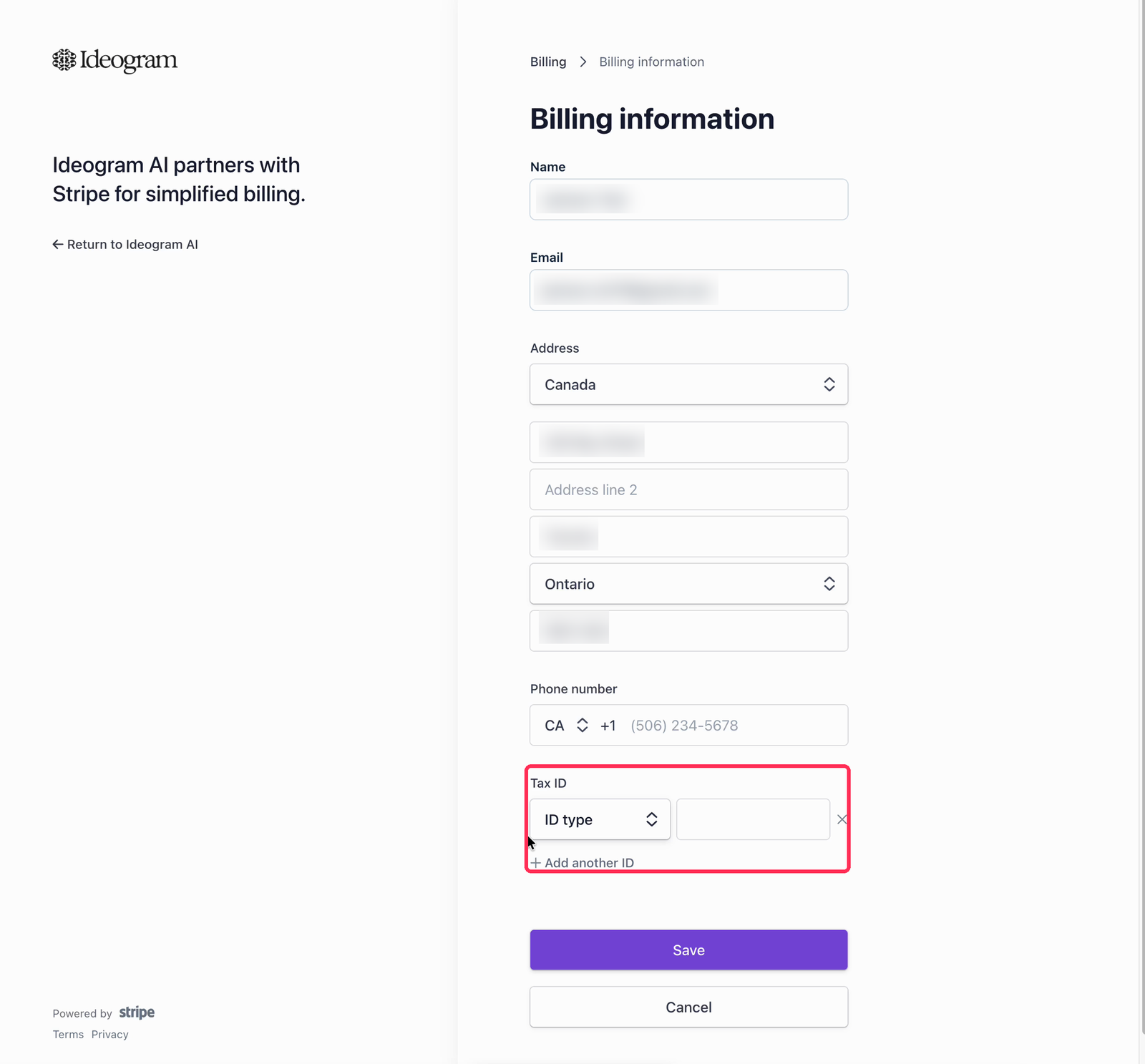
<figure><img src="https://1799634369-files.gitbook.io/~/files/v0/b/gitbook-x-prod.appspot.com/o/spaces%2FzjhNby3LLsIikYuvxAJP%2Fuploads%2Fgit-blob-96ced65e10a560408553e17262e69509b56725b3%2Fbilling-information-tax-id.png?alt=media" alt="Billing information form with name, email, address, and phone fields, and the Tax ID section highlighted"><figcaption><p>Update information in the billing portal covers company details and tax IDs.</p></figcaption></figure>

</details>

<details>

<summary>I have a specific subscription question. How do I contact support?</summary>

For specific questions or issues with your subscription, reach out to <support@ideogram.ai>. For the fastest support experience, send your email from the address your Ideogram account is registered under — it lets the team find your account right away.

</details>
