> For the complete documentation index, see [llms.txt](https://docs.ideogram.ai/llms.txt). Markdown versions of documentation pages are available by appending `.md` to page URLs; this page is available as [Markdown](https://docs.ideogram.ai/plans-and-billing/billing-and-subscriptions/switching-or-downgrading-plans.md).

# Switching or Downgrading Plans

Upgrade or downgrade your Ideogram plan, or switch between monthly and yearly billing, without cancelling. Upgrades apply now, downgrades at renewal.

You can move between Ideogram plans without cancelling and resubscribing. That covers upgrades, downgrades and moving between monthly and yearly billing.

## How to switch plans

1. Go to **Settings** → **Plans**. Your plan is marked **Current plan**.
2. Use the **Monthly / Yearly** toggle to pick your billing frequency.
3. Click the button on the plan you want:
   * **Get Pro plan** or **Get Team plan** to move up;
   * **Switch to yearly** to move your plan to yearly billing;
   * **Downgrade** to move down.
4. Confirm in the dialog.

To move to Free, cancel your subscription instead.

## Upgrades apply immediately

When you upgrade, the confirmation dialog shows a **prorated charge** that is applied to your card right away — you pay the difference between the two plans for the days left in your billing period, and future renewals are billed at the new plan's full price. Your new benefits are available as soon as the purchase completes.

<figure><img src="https://1799634369-files.gitbook.io/~/files/v0/b/gitbook-x-prod.appspot.com/o/spaces%2FzjhNby3LLsIikYuvxAJP%2Fuploads%2Fgit-blob-6123b32047afc567ff7c0c61d9660ec1f9064f24%2Fplans-upgrade-modal.png?alt=media" alt="Upgrade confirmation dialog showing that a prorated charge is applied to the card immediately and future renewals are billed at the new plan&#x27;s price, with Cancel and Complete purchase buttons"><figcaption><p>Upgrades take effect immediately, with a prorated charge for the rest of the current period.</p></figcaption></figure>

## Downgrades apply at your next renewal

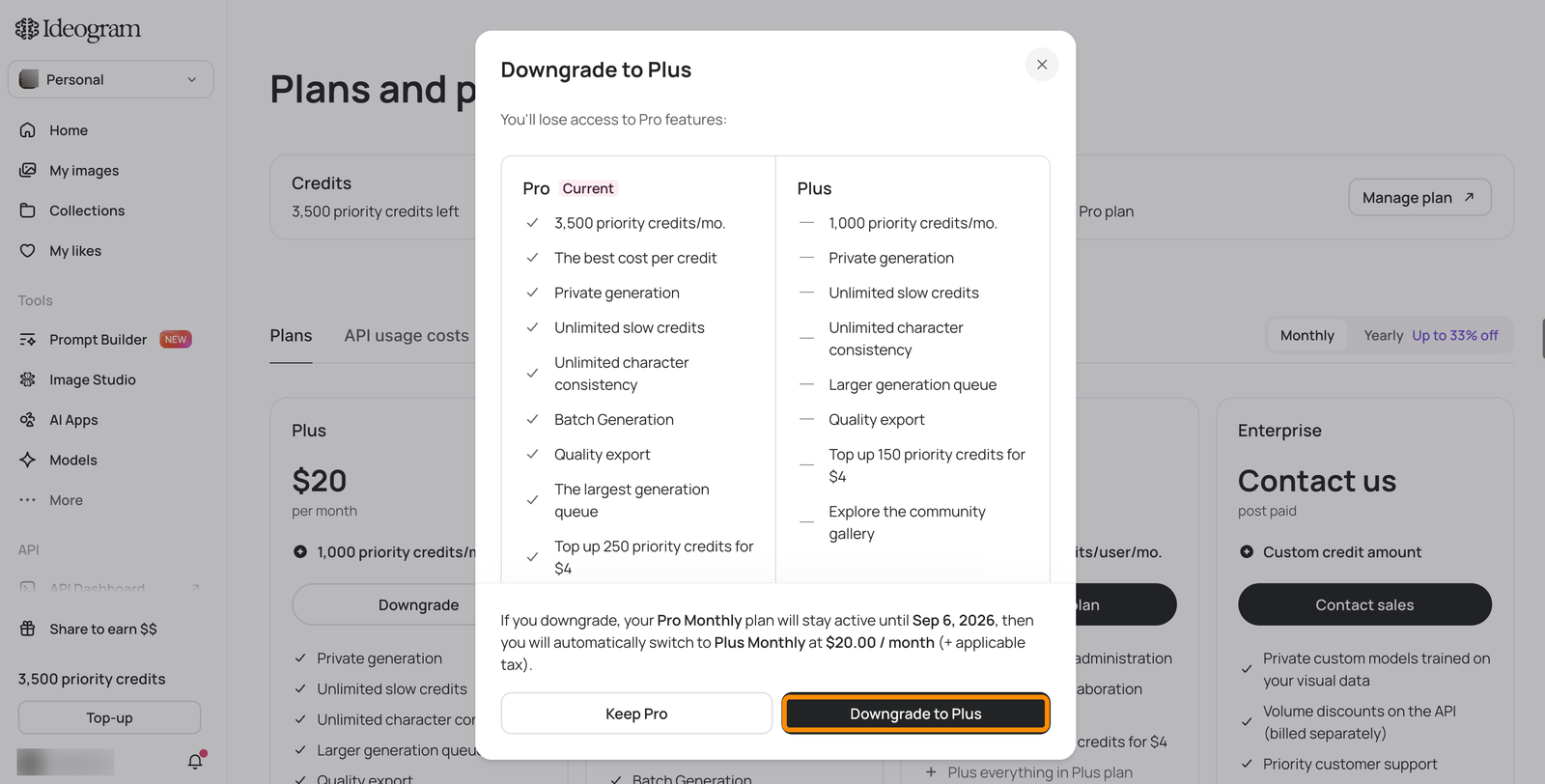
When you downgrade, the confirmation dialog compares your current plan's features against the lower plan's. Your current plan stays active until the end of the period you already paid for — there is no refund or credit for the difference — and on the renewal date you switch to the lower plan and are billed at its price.

<figure><img src="https://1799634369-files.gitbook.io/~/files/v0/b/gitbook-x-prod.appspot.com/o/spaces%2FzjhNby3LLsIikYuvxAJP%2Fuploads%2Fgit-blob-925378b49bafdfb751373a318f3db8fa0eaf258d%2Fplans-downgrade-modal.png?alt=media" alt="Downgrade confirmation dialog comparing the current plan&#x27;s features against the lower plan&#x27;s, stating the current plan stays active until the renewal date, with Keep and Downgrade buttons"><figcaption><p>The downgrade dialog shows what you'll lose and when the switch happens.</p></figcaption></figure>

### Undo a pending downgrade

While a downgrade is pending, the **Plans** page shows a banner with the switch date and a **Keep** button, and the lower plan's card shows **Cancel downgrade**.

1. Go to **Settings** → **Plans**.
2. Click **Keep** in the banner, or **Cancel downgrade** on the lower plan's card.

You stay on your current plan.

The app confirms **Your pending downgrade has been cancelled** after a successful undo. If you see **Error cancelling downgrade**, the request hasn't been confirmed; try again later and check whether the pending-change banner is still present.

<figure><img src="https://1799634369-files.gitbook.io/~/files/v0/b/gitbook-x-prod.appspot.com/o/spaces%2FzjhNby3LLsIikYuvxAJP%2Fuploads%2Fgit-blob-347926c19437e8e95662968c592fc615c879d3ec%2Fplans-downgrade-pending.png?alt=media" alt="Plans and pricing page with a pending downgrade: a banner shows the switch date with a Keep Pro button highlighted, and the lower plan&#x27;s card shows a highlighted Cancel downgrade button"><figcaption><p>A pending downgrade can be undone from the banner or the plan card.</p></figcaption></figure>

### Can I change a pending downgrade?

If you choose another available lower plan while a downgrade is pending, the confirmation warns **This will replace your pending downgrade**. Review the destination plan, billing frequency, effective date and price before confirming. You're replacing a scheduled change, rather than stacking two future downgrades.

## What if an upgrade quote or payment fails?

The upgrade dialog loads a current prorated quote before offering confirmation. If that preview can't load, the app shows **Unable to upgrade plan** and directs you to support. If payment fails after confirmation, the dialog says **We couldn't process your payment**.

Check the plan shown in Settings before assuming a change completed. A successful upgrade can show **Plan upgraded — Your upgraded plan is ready to use**. For an error that remains unresolved, contact support with your account email, intended plan and billing frequency, and the message you saw.

## Check the billing frequency before you confirm

Each plan is available with monthly or yearly billing, and the checkout shows both. Double-check that you selected the plan **and** the billing frequency you intended — for example, yearly Plus charges $180 at once, while monthly Plus charges $20. Ideogram doesn't offer refunds (see [Refunds](/plans-and-billing/billing-and-subscriptions/refunds.md)).

## Changes that aren't self-serve

* **Yearly to monthly billing** can't be changed from the **Plans** page; monthly plans show **Not available** while you're on a yearly plan. Contact <support@ideogram.ai>.
* **Team plans** can't be downgraded to an individual plan (Plus, Pro, or the legacy Basic plan) from the billing screen. Contact <support@ideogram.ai>.

When contacting support, email from the address your Ideogram account is registered under — it lets the team find your subscription right away and gives you the fastest turnaround.

For what each plan includes, see [Plans and Credits](/plans-and-billing/available-plans.md) and [ideogram.ai/pricing](https://ideogram.ai/pricing).