> For the complete documentation index, see [llms.txt](https://docs.ideogram.ai/llms.txt). Markdown versions of documentation pages are available by appending `.md` to page URLs; this page is available as [Markdown](https://docs.ideogram.ai/plans-and-billing/billing-and-subscriptions/cancelling-your-subscription.md).

# Cancelling Your Subscription

How to cancel your Ideogram subscription and stop auto-renew. Cancel at least 5 days before renewal; you keep your plan until the paid period ends.

You can cancel your Ideogram subscription at any time from the billing portal. Cancelling stops future renewal charges — it does not end your current paid period early. This is also how you unsubscribe or stop auto-renew.

{% hint style="warning" %}
**Cancel at least 5 days before your renewal date.** Per Ideogram's [Terms of Service](https://ideogram.ai/legal/tos), cancellations must be made five (5) days before the subscription renewal date. If you cancel closer to the renewal date, the next charge may still be processed.
{% endhint %}

{% hint style="info" %}
**Subscribed in the iOS app?** Cancel in the App Store instead. Cancelling on the website won't stop Apple's charges. See [Subscriptions Through the iOS App](/plans-and-billing/billing-and-subscriptions/ios-app-subscriptions.md).
{% endhint %}

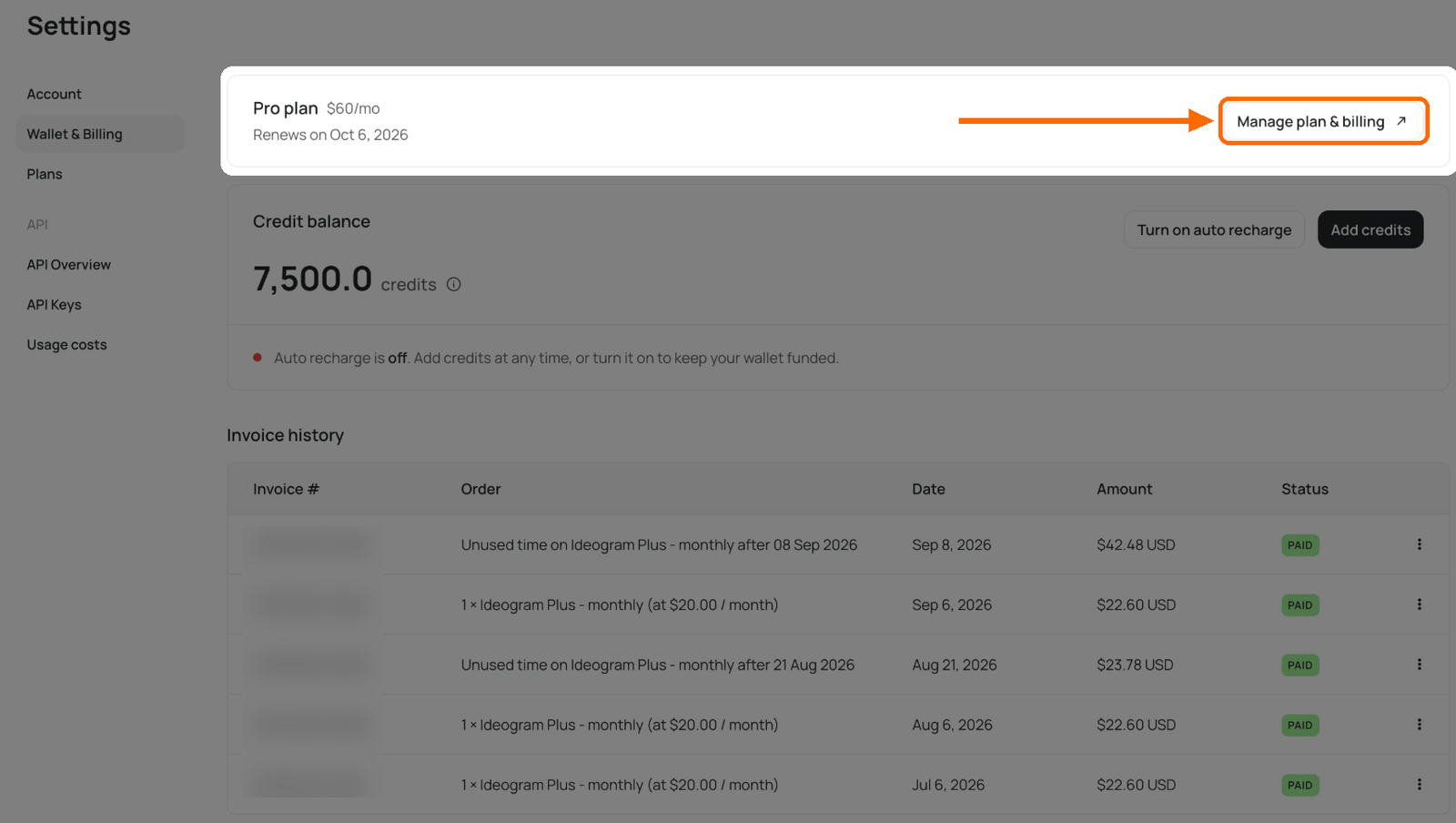
To find your renewal date, open **Wallet & Billing**. The plan card shows **Renews on** and the date.

<figure><img src="https://1799634369-files.gitbook.io/~/files/v0/b/gitbook-x-prod.appspot.com/o/spaces%2FzjhNby3LLsIikYuvxAJP%2Fuploads%2Fgit-blob-8b8f3b76a3c1c32fc9cc8372ed5e4d953c53ab02%2Fwallet-billing-plan-spotlight.png?alt=media" alt="Wallet &#x26; Billing page with everything dimmed except the plan card, which shows Pro plan $60/mo and Renews on Oct 6, 2026; an orange arrow and box point to Manage plan &#x26; billing"><figcaption><p>The plan card shows your renewal date and the <strong>Manage plan &#x26; billing</strong> button.</p></figcaption></figure>

## How to cancel

1. Make sure you are signed in to the account that holds the subscription. If you don't see a paid plan on your account, check whether you subscribed under a different sign-in method or email — see [Troubleshooting Billing Issues](/plans-and-billing/billing-and-subscriptions/troubleshooting-billing-issues.md).
2. Click your avatar at the bottom of the sidebar and select **Wallet & Billing**.
3. In the plan card, click **Manage plan & billing**. The billing portal opens in a new tab.
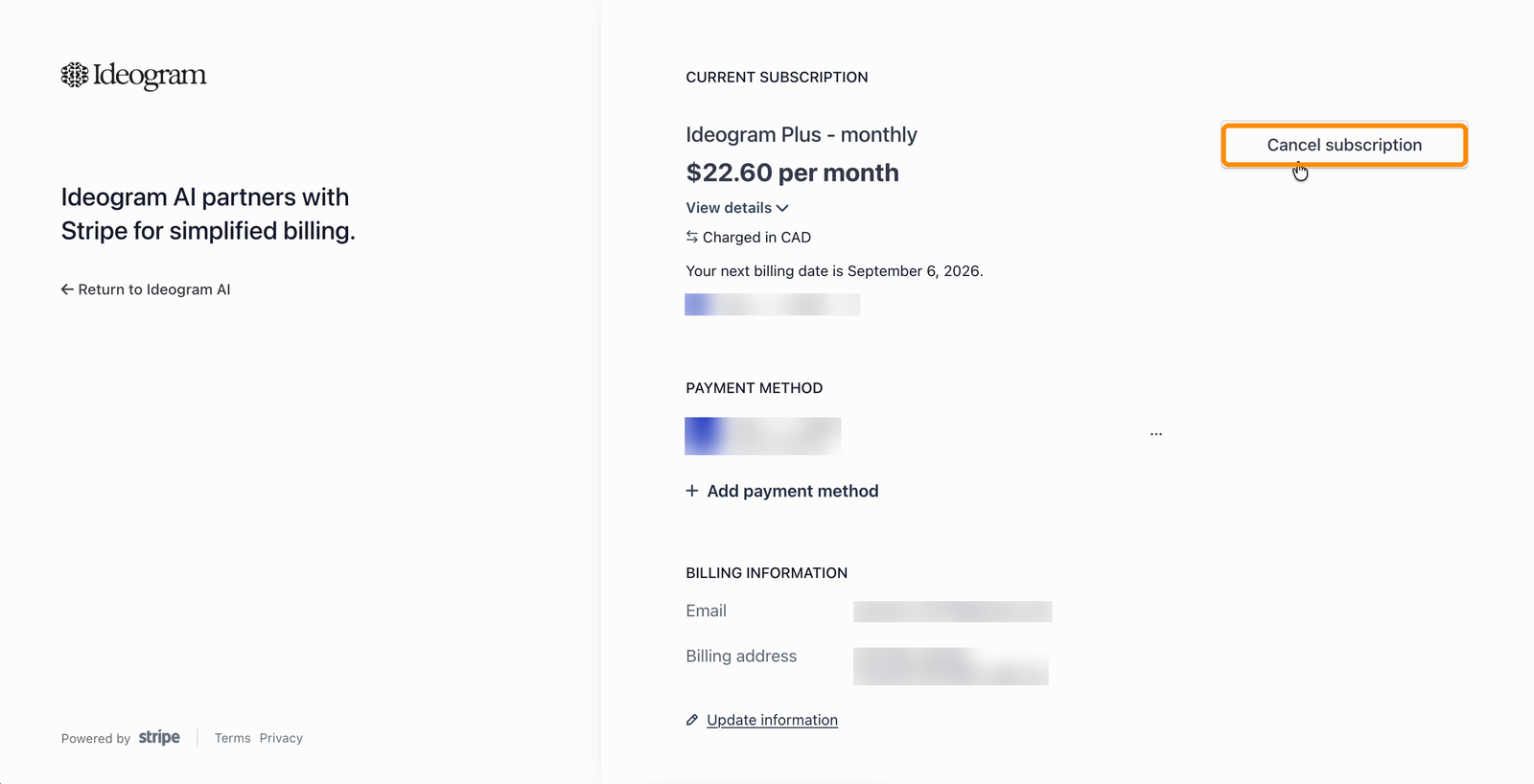
4. In the billing portal, click **Cancel subscription** next to your current subscription.

<figure><img src="https://1799634369-files.gitbook.io/~/files/v0/b/gitbook-x-prod.appspot.com/o/spaces%2FzjhNby3LLsIikYuvxAJP%2Fuploads%2Fgit-blob-3f3febf9fbe844167fe270070d0400458a5f2eba%2Fbilling-portal-cancel-subscription.png?alt=media" alt="Billing portal showing the current subscription, payment method, and billing information, with the Cancel subscription button highlighted"><figcaption><p>The <strong>Cancel subscription</strong> button in the billing portal.</p></figcaption></figure>

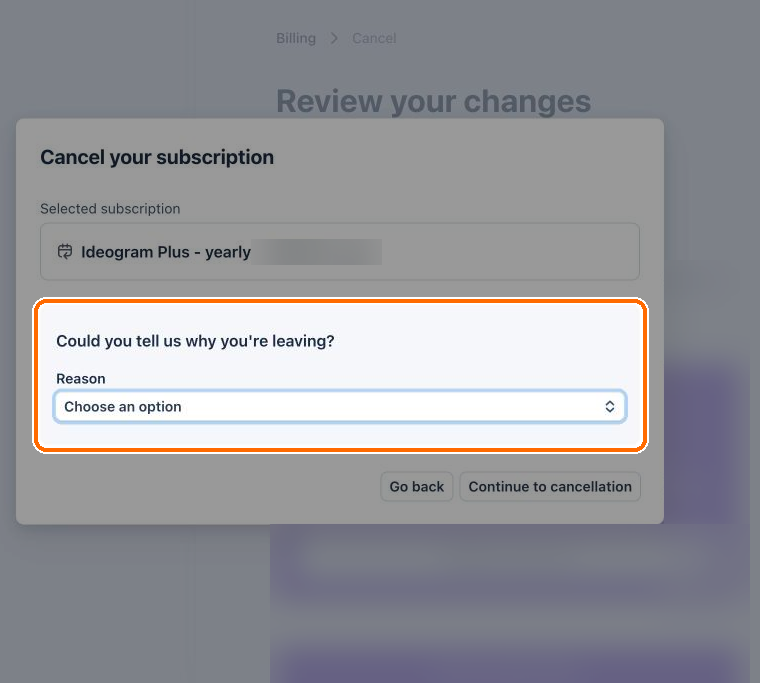
5. Pick a reason for leaving from the list, then click **Continue to cancellation**.

<figure><img src="https://1799634369-files.gitbook.io/~/files/v0/b/gitbook-x-prod.appspot.com/o/spaces%2FzjhNby3LLsIikYuvxAJP%2Fuploads%2Fgit-blob-47a4aa5a8f1fe5e26b5e49eac8b6bb51922f8b3e%2Fbilling-cancel-reason.png?alt=media" alt="Cancel your subscription dialog asking why you&#x27;re leaving, with the Reason list highlighted and Go back and Continue to cancellation buttons below"><figcaption><p>Choose a reason, then continue. <strong>Go back</strong> keeps your plan.</p></figcaption></figure>

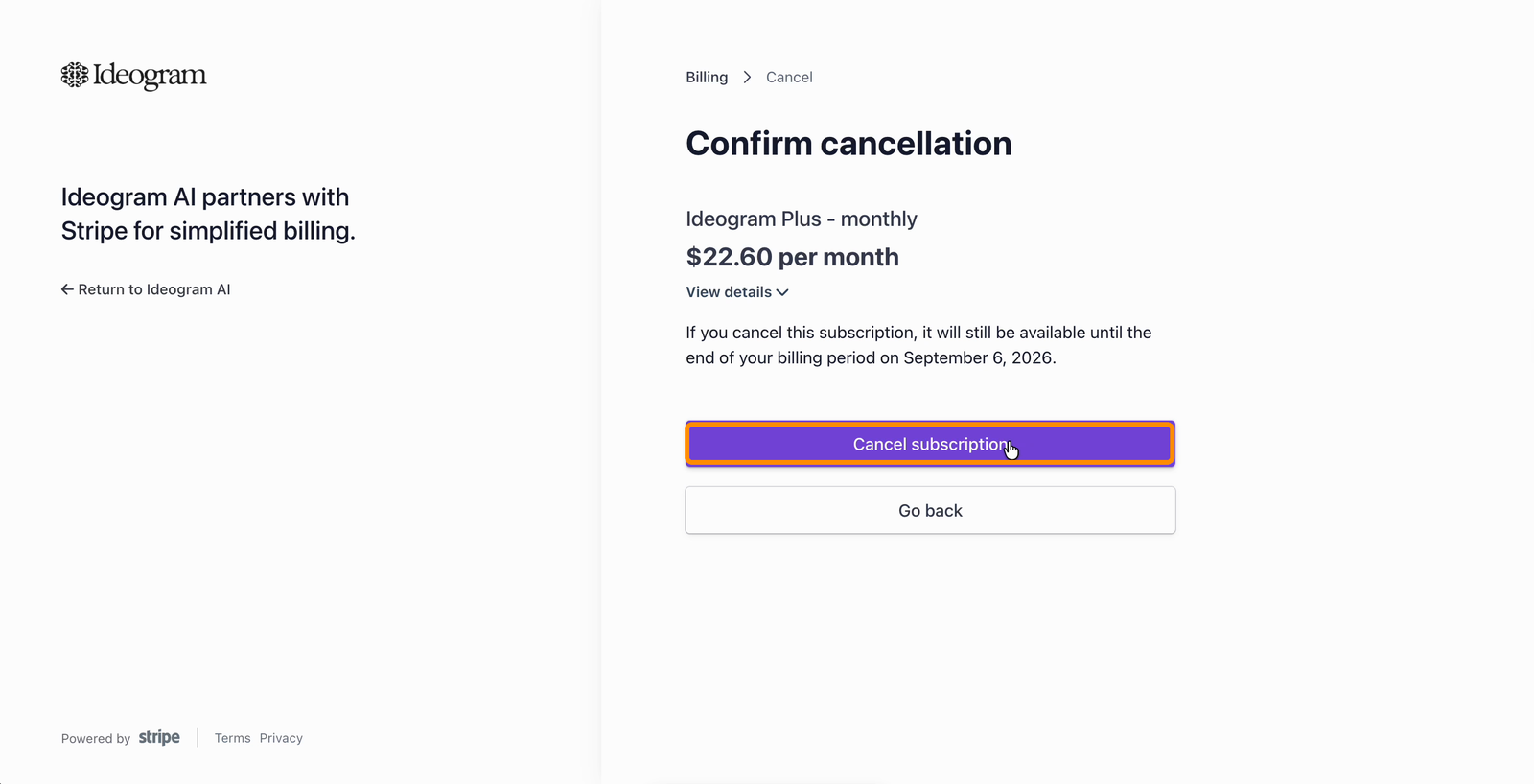
6. Review the confirmation page — it shows the date your access ends — and click **Cancel subscription** to confirm.

<figure><img src="https://1799634369-files.gitbook.io/~/files/v0/b/gitbook-x-prod.appspot.com/o/spaces%2FzjhNby3LLsIikYuvxAJP%2Fuploads%2Fgit-blob-3e62b50c50683fa725358bbf95fc5e69b3179c80%2Fbilling-confirm-cancellation.png?alt=media" alt="Confirm cancellation page stating the subscription remains available until the end of the billing period, with the Cancel subscription button highlighted"><figcaption><p>Your plan stays active until the end of the period you already paid for.</p></figcaption></figure>

## What happens after you cancel

* You keep your plan benefits until the end of the period you have already paid for. Ideogram doesn't offer refunds, including for partly used periods. See [Refunds](/plans-and-billing/billing-and-subscriptions/refunds.md).
* When the paid period ends, your account moves to the free plan, or to pay as you go if you still have purchased credits.
* Unused monthly credits end with your plan. Credits you bought separately stay usable until they expire, 365 days after purchase. See [Buying Extra Credits](/plans-and-billing/buying-extra-credits.md).
* Existing private images remain private. New images you make on the free plan are public. See [Share and Publish](/organize-and-share/share-and-publish.md).

## Monthly and annual plans

The cancellation steps are the same for monthly and annual billing. In both cases, cancelling stops the next renewal; your access continues until the end of the current billing period. Annual subscribers keep access until the end of the prepaid year.

## Confirming your cancellation

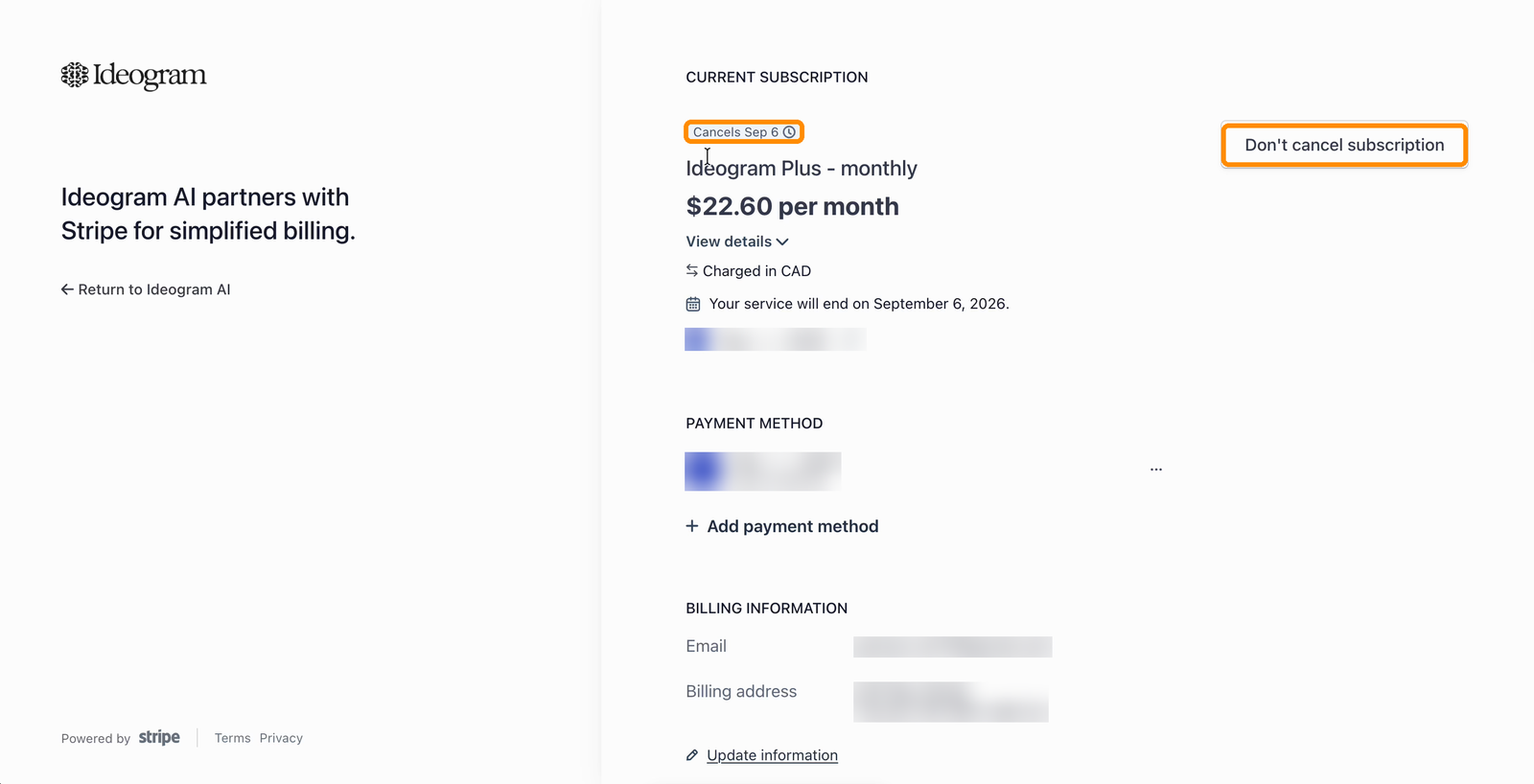
After cancelling, the billing portal shows a **Cancels** badge on your subscription and the date your service ends. If you don't see this, the cancellation did not complete — try again or contact <support@ideogram.ai> from the email address your Ideogram account is registered under.

<figure><img src="https://1799634369-files.gitbook.io/~/files/v0/b/gitbook-x-prod.appspot.com/o/spaces%2FzjhNby3LLsIikYuvxAJP%2Fuploads%2Fgit-blob-b53d8fe0defee85524f4c209a68fc2a44f436fdb%2Fbilling-cancelled-dont-cancel.png?alt=media" alt="Billing portal after cancelling, showing a Cancels badge with the service end date, and the Don&#x27;t cancel subscription button highlighted"><figcaption><p>A completed cancellation shows the end date — and can be undone.</p></figcaption></figure>

## Changed your mind?

As long as your paid period hasn't ended, you can undo a cancellation:

1. Open the billing portal again and click **Don't cancel subscription**.
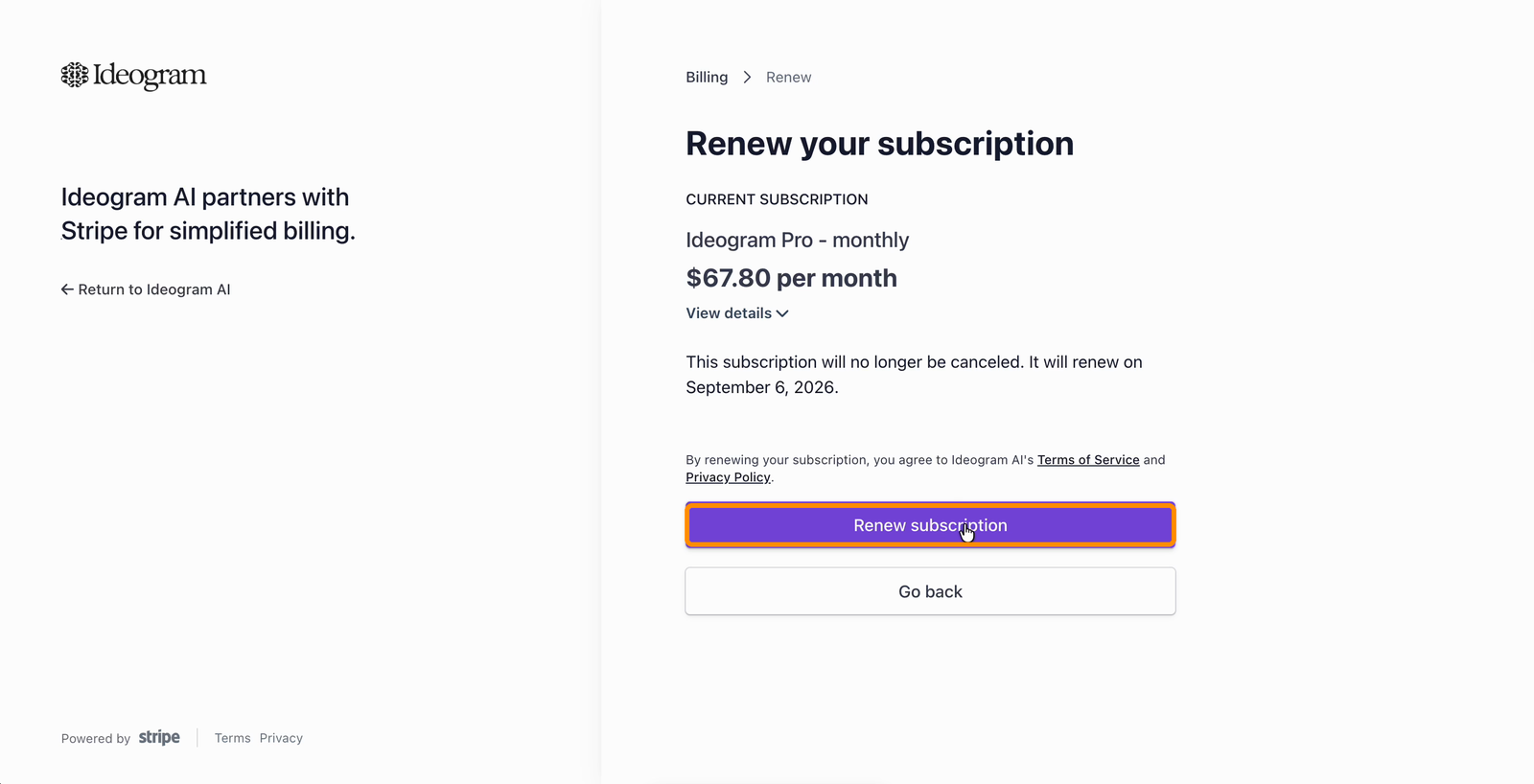
2. On the **Renew your subscription** page, click **Renew subscription**. Your plan will no longer be cancelled and renews on your usual date.

<figure><img src="https://1799634369-files.gitbook.io/~/files/v0/b/gitbook-x-prod.appspot.com/o/spaces%2FzjhNby3LLsIikYuvxAJP%2Fuploads%2Fgit-blob-4efcb676512d1ed9541592f43c0e2b926fcf3c63%2Fbilling-renew-subscription.png?alt=media" alt="Renew your subscription page stating the subscription will no longer be cancelled and will renew on the usual date, with the Renew subscription button highlighted"><figcaption><p>Renewing undoes the cancellation; billing continues as before.</p></figcaption></figure>