> For the complete documentation index, see [llms.txt](https://docs.ideogram.ai/llms.txt). Markdown versions of documentation pages are available by appending `.md` to page URLs; this page is available as [Markdown](https://docs.ideogram.ai/prompting/refine-and-iterate.md).

# Refine and Iterate

Change one thing at a time, word your prompt precisely, and pick the right tool to move an image closer to what you want.

Your first image is a draft. Small, deliberate changes to the prompt, or a quick edit on the image itself, usually get you closer than starting over.

## Change one thing at a time

Change a single word or phrase per round, so you can see what each change did. Fix the [seed](/create/image-settings.md#seed) and turn Magic Prompt off while you do this: with the same seed and settings, the only thing that moves is your wording.

> **Start:** "A black cat sitting on a windowsill during a storm"
>
> 1. "A black cat sitting on a windowsill during a **light drizzle**"
> 2. "A black **dog** sitting on a windowsill during a light drizzle"

## Build up in steps

Start short and add one detail per generation. You catch the moment a new detail pulls the image off course.

> 1. "A medieval castle"
> 2. "A medieval castle on a hilltop"
> 3. "A medieval castle on a hilltop at sunset"
> 4. "A medieval castle on a hilltop at sunset with a dragon flying overhead"

## Be precise

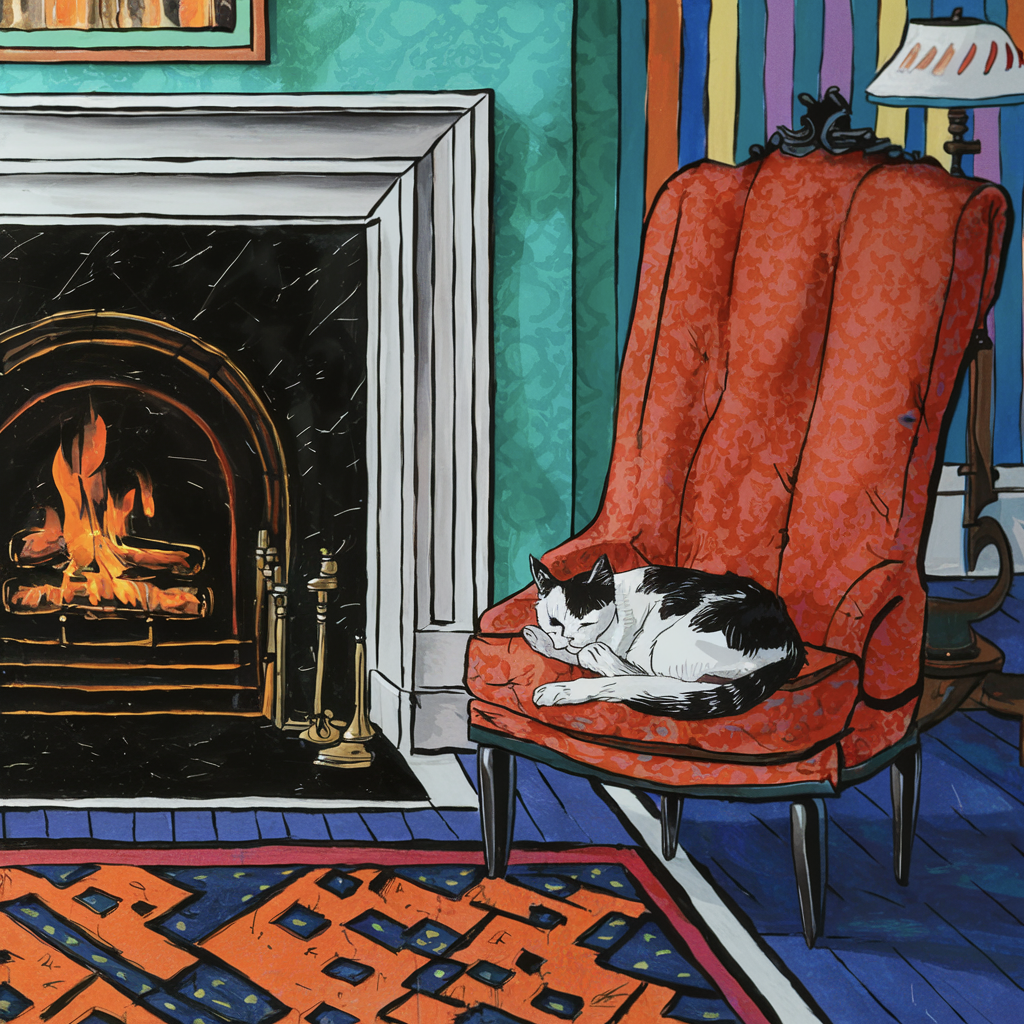
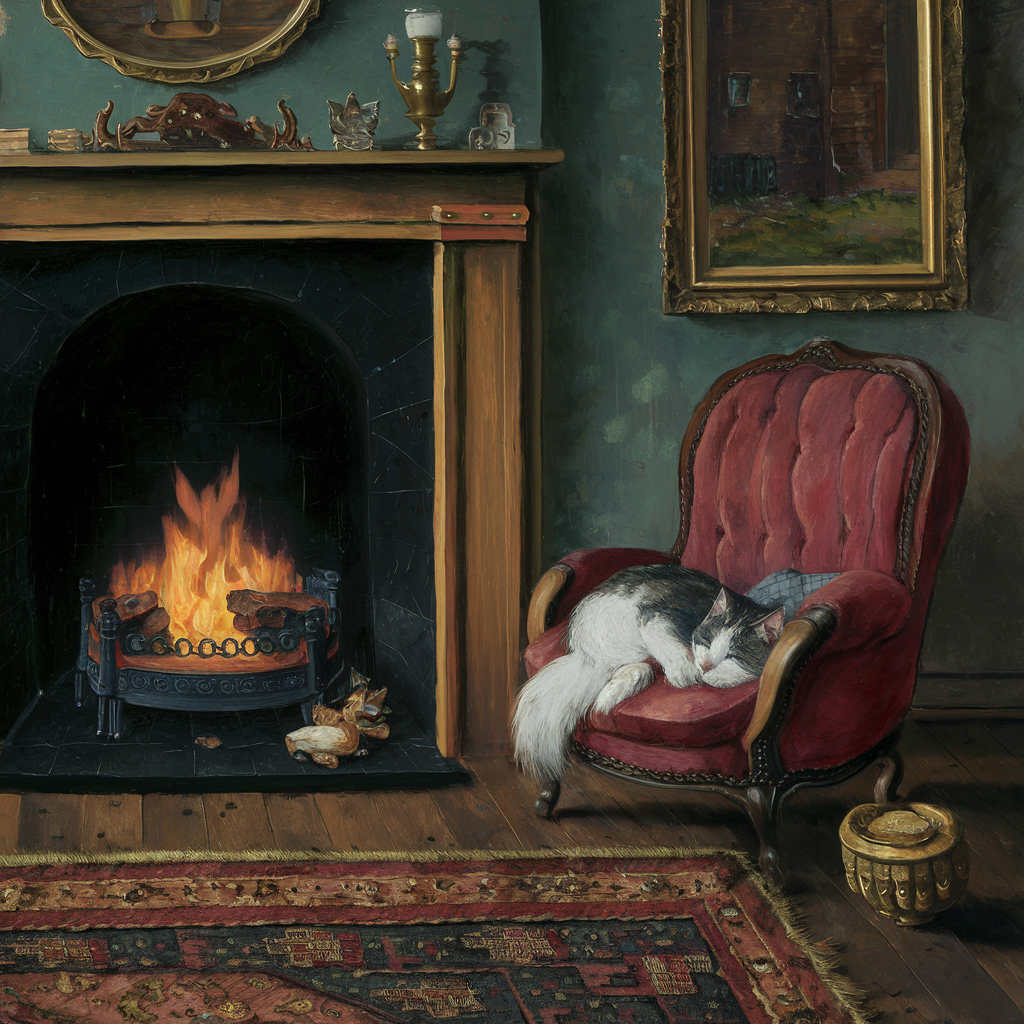
Ideogram reads every word. "A painting of a cat" gets you something painterly; naming the kind of painting decides which one.

<table data-view="cards"><thead><tr><th></th><th></th><th></th></tr></thead><tbody><tr><td><img src="https://1799634369-files.gitbook.io/~/files/v0/b/gitbook-x-prod.appspot.com/o/spaces%2FzjhNby3LLsIikYuvxAJP%2Fuploads%2FrmjNJSKpa4vTJzHkvxb0%2Fimage.png?alt=media&amp;token=ca901e12-73c1-4dc4-b545-18e84369cc6e" alt="Traditional painting of a black-and-white cat sleeping on a red armchair beside a lit fireplace in a cozy room" data-size="original"></td><td><p><strong>Prompt:</strong></p><p><em>A painting figuring a cat sleeping next to the fireplace.</em></p></td><td></td></tr><tr><td><img src="https://1799634369-files.gitbook.io/~/files/v0/b/gitbook-x-prod.appspot.com/o/spaces%2FzjhNby3LLsIikYuvxAJP%2Fuploads%2FEWqArUp37Fy67x0fr2gR%2Fimage.png?alt=media&amp;token=9b61e920-150c-4247-8358-00fbe9e2a7d3" alt="Thick impasto painting with heavy brushstrokes of an orange tabby cat curled asleep on the floor beside a fireplace" data-size="original"></td><td><p><strong>Prompt:</strong></p><p><em>An <mark style="color:green;">abstract impasto</mark> painting figuring a cat sleeping next to the fireplace.</em></p></td><td></td></tr><tr><td><img src="https://1799634369-files.gitbook.io/~/files/v0/b/gitbook-x-prod.appspot.com/o/spaces%2FzjhNby3LLsIikYuvxAJP%2Fuploads%2FgLXKa1rcHbGzBDyxG4If%2Fimage.png?alt=media&amp;token=814a1505-0f6a-4e45-8f8f-4c5c2e697d90" alt="Soft minimalist watercolor of a calico cat sleeping by a fireplace, with a teal sofa and small side table nearby" data-size="original"></td><td><p><strong>Prompt:</strong></p><p><em>A <mark style="color:green;">soft minimalist watercolor</mark> painting figuring a cat sleeping next to the fireplace.</em></p></td><td></td></tr><tr><td><img src="https://1799634369-files.gitbook.io/~/files/v0/b/gitbook-x-prod.appspot.com/o/spaces%2FzjhNby3LLsIikYuvxAJP%2Fuploads%2FKTlGoqHD8jNCr3gy7b6l%2Fimage.png?alt=media&amp;token=015d1edc-4184-41e1-ad72-b0d9e1e3a0b8" alt="Bold pop art illustration of a black-and-white cat curled on a red armchair beside a fireplace and striped wallpaper" data-size="original"></td><td><p><strong>Prompt:</strong></p><p><em>A <mark style="color:green;">pop art</mark> painting figuring a cat sleeping next to the fireplace.</em></p></td><td></td></tr></tbody></table>

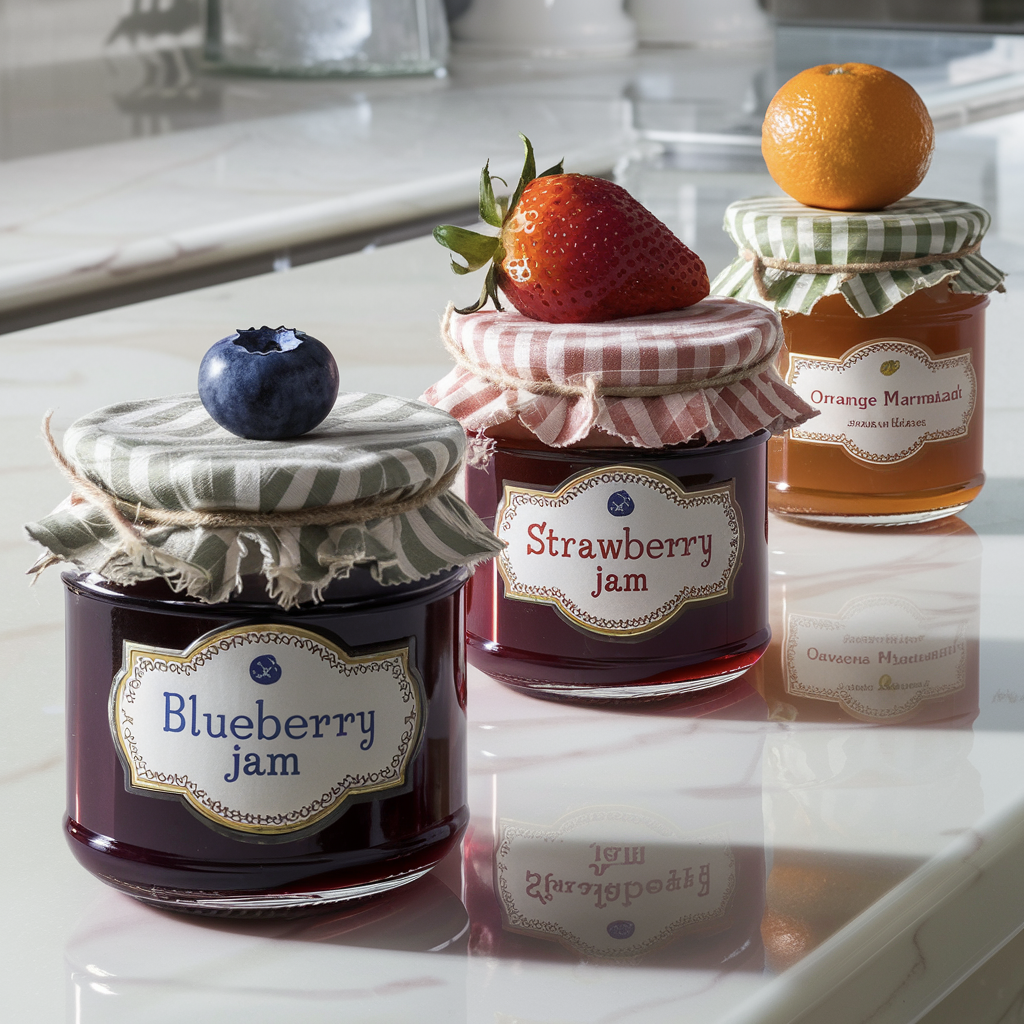
Precision covers position too. Say where each thing sits and in what order, and Ideogram tends to follow:

<figure><img src="https://1799634369-files.gitbook.io/~/files/v0/b/gitbook-x-prod.appspot.com/o/spaces%2FzjhNby3LLsIikYuvxAJP%2Fuploads%2Fm4WwDuohJOhW6EK0V1u5%2Fimage.png?alt=media&amp;token=52b93242-0d72-4709-9315-35dedc463f7e" alt="Three jars on a kitchen counter labelled Blueberry Jam, Strawberry Jam and Orange Marmalade, each topped with its fruit" width="375"><figcaption><p>"...The first jar on the left, in the foreground, is a blueberry jam jar, with a blueberry adorning its lid. The second jar, in the middle and slightly recessed, is a jar of strawberry jam... The third jar, on the right and farthest back, is a jar of orange marmalade..."</p></figcaption></figure>

## Describe only what should show

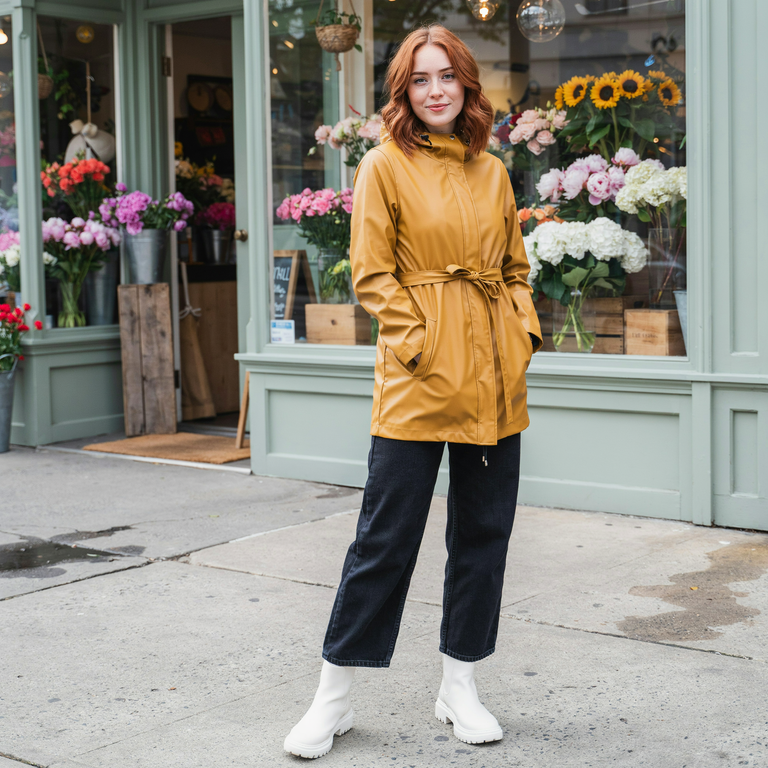
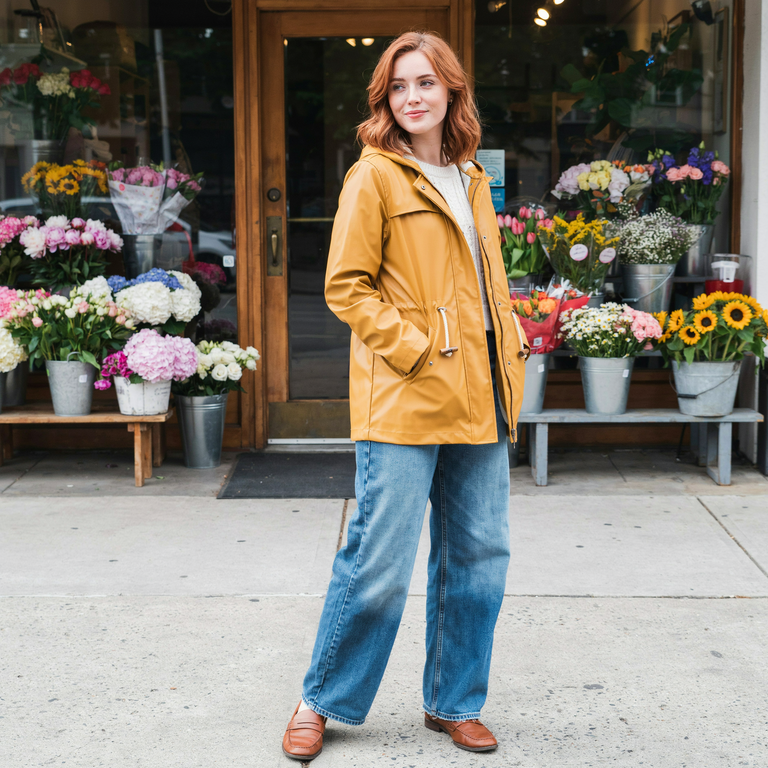
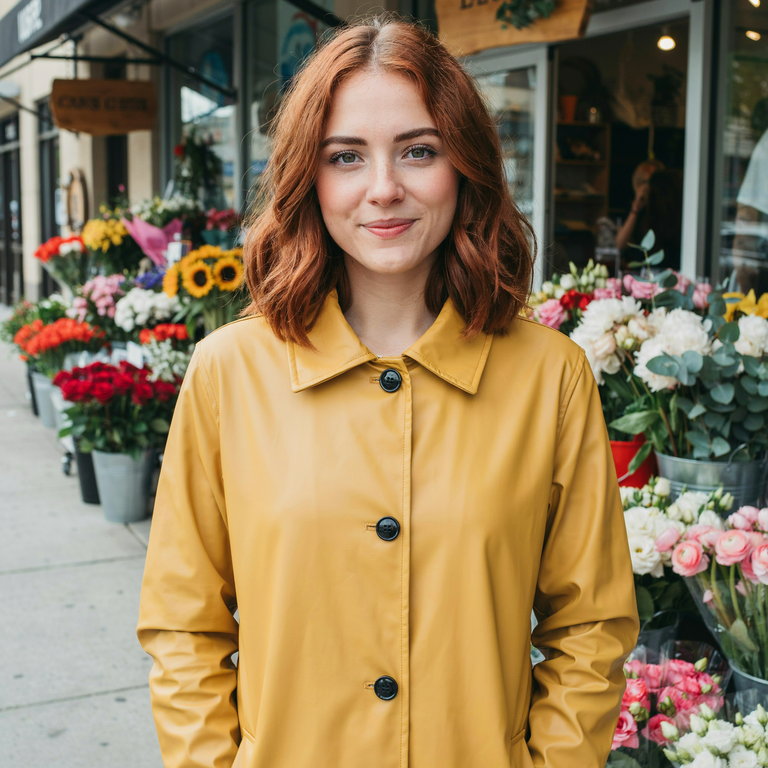
If you describe something, Ideogram tries to show it, even when that breaks the framing you asked for. Below, the goal was a portrait. Mentioning boots, or even just jeans, forced a full-length shot; cutting everything below the waist brought the camera in close.

<table data-view="cards"><thead><tr><th></th><th></th><th></th></tr></thead><tbody><tr><td><img src="https://1799634369-files.gitbook.io/~/files/v0/b/gitbook-x-prod.appspot.com/o/spaces%2FzjhNby3LLsIikYuvxAJP%2Fuploads%2Fgit-blob-d037f97d4b38e7ebeae5f979e12f846b642943e5%2Frefine-portrait-boots.png?alt=media" alt="Full-length photo of a young woman with copper hair in a mustard raincoat, dark jeans and white rain boots outside a flower shop" data-size="original"></td><td><p><strong>Prompt:</strong></p><p><em>Portrait photo of a young woman with copper hair, wearing a mustard raincoat, wide-leg jeans, and white rain boots, in front of a flower shop.</em></p></td><td></td></tr><tr><td><img src="https://1799634369-files.gitbook.io/~/files/v0/b/gitbook-x-prod.appspot.com/o/spaces%2FzjhNby3LLsIikYuvxAJP%2Fuploads%2Fgit-blob-fa5e8c954bc88e5a67e7a779f10b7bcf9a342cb5%2Frefine-portrait-jeans.png?alt=media" alt="Still a full-length photo of the woman in the mustard raincoat and light wide-leg jeans in front of the flower shop" data-size="original"></td><td><p><strong>Prompt:</strong></p><p><em>Portrait photo of a young woman with copper hair, wearing a mustard raincoat, wide-leg jeans, </em><del><em><mark style="color:purple;">and white rain boots</mark></em></del><em>, in front of a flower shop.</em></p></td><td></td></tr><tr><td><img src="https://1799634369-files.gitbook.io/~/files/v0/b/gitbook-x-prod.appspot.com/o/spaces%2FzjhNby3LLsIikYuvxAJP%2Fuploads%2Fgit-blob-9e31db7c1e5f4034f9a58103297da189874b12dd%2Frefine-portrait-coat.png?alt=media" alt="Close head-and-shoulders portrait of the woman with copper hair in the mustard raincoat, flower buckets behind her" data-size="original"></td><td><p><strong>Prompt:</strong></p><p><em>Portrait photo of a young woman with copper hair, wearing a mustard raincoat, </em><del><em><mark style="color:purple;">wide-leg jeans, and white rain boots</mark></em></del><em>, in front of a flower shop.</em></p></td><td></td></tr></tbody></table>

## Try other words

Some words just don't produce the look you want. Swap in a synonym or describe the idea in plain visual terms:

> **Instead of** "lush jungle", **try** "dense rainforest"
>
> **Instead of** "sad expression", **try** "a face with downturned eyes and a slight frown"

If one swap doesn't help, change the related words around it too; a neighbor may be pulling the other way. A thesaurus or a chat assistant can suggest options.

## Emphasize what matters

When the image is right overall but a key detail comes out small or goes missing, give it more weight.

**Mention it more than once.** Refer to the same subject in the summary, the details and the framing:

> "A product photo of a men's perfume bottle named "Nightlife for men" in a sleek studio setup. The bottle is tall and rectangular with dark glass... The bottle stands upright... The bottle is centered in the frame..."

**Describe it more fully.** Add size, color, texture or placement, and tie it to the rest of the scene. If a person's shoes come out missing or odd, "wearing black leather boots that cast a shadow on the sidewalk" gives Ideogram both the object and where it sits.

## Pick the right tool

Rewording isn't always the fastest fix. Once you have an image you mostly like, edit it instead of rolling the dice again.

| Goal                                              | What to do                                                                                   |
| ------------------------------------------------- | -------------------------------------------------------------------------------------------- |
| See what one word changes                         | Fix the [seed](/create/image-settings.md#seed), change one word, generate again              |
| Get more options from a prompt that works         | Generate again, or select **Recreate** on a result to restore its settings                   |
| Keep the look, try a variation                    | **Remix** it in the [Remix app](/edit/remix.md) with a tweaked prompt                        |
| Change one thing in a finished image              | **AI edit** in [Studio](/edit/studio.md), describing the change in words                     |
| Fix a small area (a hand, a face, a word of text) | **Select area** in Studio (paid plans), then describe what should be there                   |
| Show more of the scene or change the shape        | **Reframe** in Studio, or **Extend** (paid plans)                                            |
| Turn a short idea into a full prompt              | Write a few words and let [Magic Prompt](/create/image-settings.md#magic-prompt) expand them |
| Keep your exact wording                           | Turn Magic Prompt off                                                                        |
| Control the layout exactly                        | Write a [JSON prompt](/prompting/json-prompting.md)                                          |

If something keeps going wrong, check [Fix Common Problems](/prompting/fix-common-problems.md).