> For the complete documentation index, see [llms.txt](https://docs.ideogram.ai/llms.txt). Markdown versions of documentation pages are available by appending `.md` to page URLs; this page is available as [Markdown](https://docs.ideogram.ai/prompting/refine-and-iterate.md).

# Refine and Iterate

Prompt tips for a better image. Change one thing at a time, word your prompt precisely, and pick the right tool to get closer to what you want.

Your first image is a draft. Small, deliberate changes to the prompt, or a quick edit on the image itself, usually get you closer than starting over.

## Change one thing at a time

Change a single word or phrase per round, so you can see what each change did. Keep the model and settings fixed, set a [seed](/create/image-settings.md#seed), and turn Magic Prompt off where it is available. This reduces the variables you change together; it doesn't guarantee that every pixel stays the same.

> **Start:** "A black cat sitting on a windowsill during a storm"
>
> 1. "A black cat sitting on a windowsill during a **light drizzle**"
> 2. "A black **dog** sitting on a windowsill during a light drizzle"

## Build up in steps

Start short and add one detail per generation. You catch the moment a new detail pulls the image off course.

> 1. "A medieval castle"
> 2. "A medieval castle on a hilltop"
> 3. "A medieval castle on a hilltop at sunset"
> 4. "A medieval castle on a hilltop at sunset with a dragon flying overhead"

## Be precise

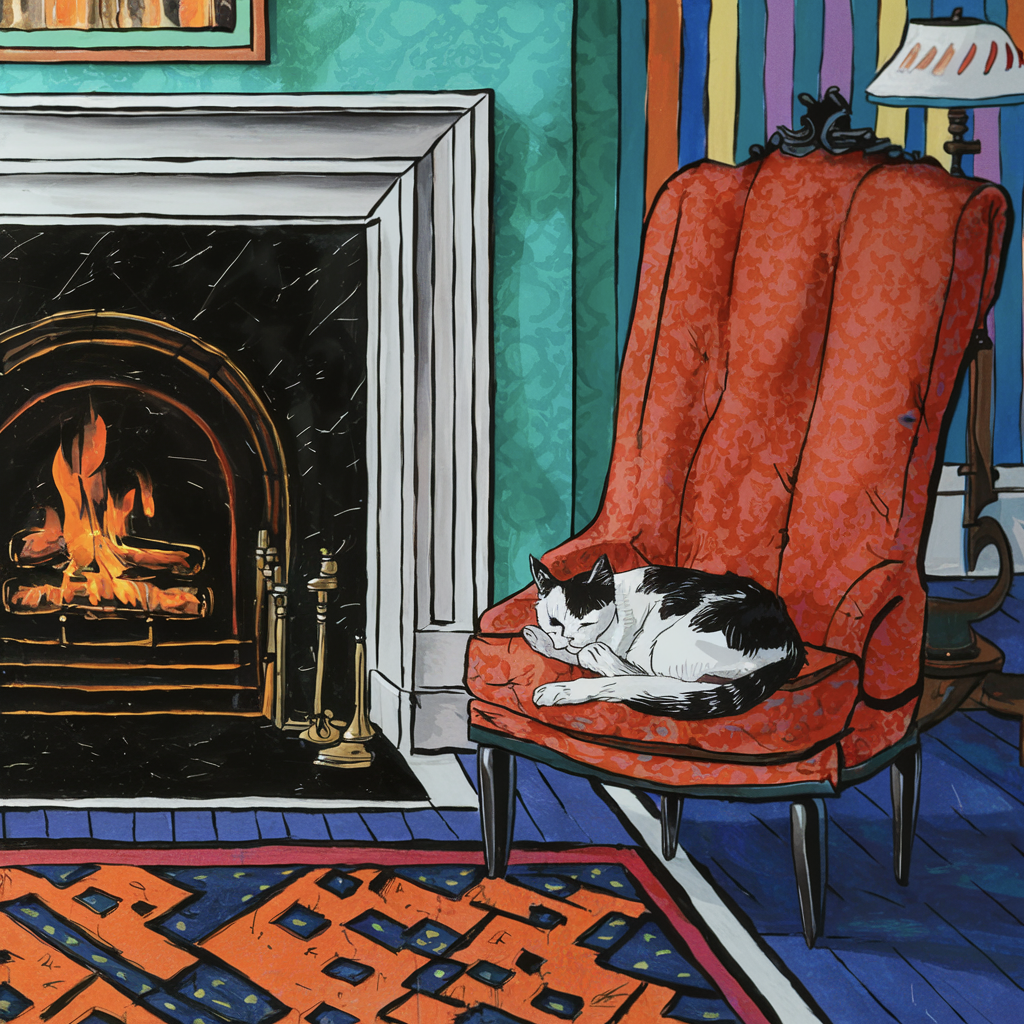
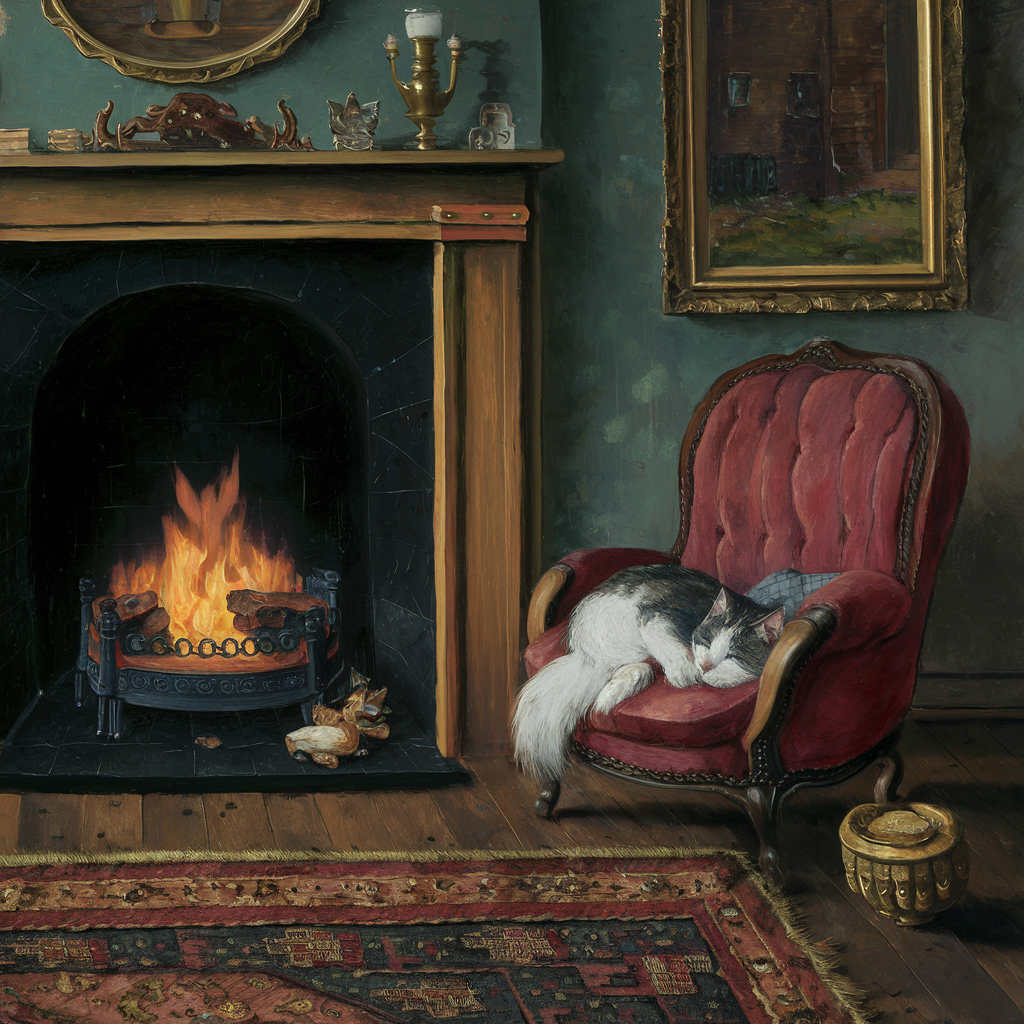
Ideogram reads every word. "A painting of a cat" gets you something painterly; naming the kind of painting decides which one.

<table data-view="cards"><thead><tr><th></th><th></th><th></th></tr></thead><tbody><tr><td><img src="https://1799634369-files.gitbook.io/~/files/v0/b/gitbook-x-prod.appspot.com/o/spaces%2FzjhNby3LLsIikYuvxAJP%2Fuploads%2FrmjNJSKpa4vTJzHkvxb0%2Fimage.png?alt=media&amp;token=ca901e12-73c1-4dc4-b545-18e84369cc6e" alt="Traditional painting of a black-and-white cat sleeping on a red armchair beside a lit fireplace in a cozy room" data-size="original"></td><td><p><strong>Prompt:</strong></p><p><em>A painting figuring a cat sleeping next to the fireplace.</em></p></td><td></td></tr><tr><td><img src="https://1799634369-files.gitbook.io/~/files/v0/b/gitbook-x-prod.appspot.com/o/spaces%2FzjhNby3LLsIikYuvxAJP%2Fuploads%2FEWqArUp37Fy67x0fr2gR%2Fimage.png?alt=media&amp;token=9b61e920-150c-4247-8358-00fbe9e2a7d3" alt="Thick impasto painting with heavy brushstrokes of an orange tabby cat curled asleep on the floor beside a fireplace" data-size="original"></td><td><p><strong>Prompt:</strong></p><p><em>An <mark style="color:green;">abstract impasto</mark> painting figuring a cat sleeping next to the fireplace.</em></p></td><td></td></tr><tr><td><img src="https://1799634369-files.gitbook.io/~/files/v0/b/gitbook-x-prod.appspot.com/o/spaces%2FzjhNby3LLsIikYuvxAJP%2Fuploads%2FgLXKa1rcHbGzBDyxG4If%2Fimage.png?alt=media&amp;token=814a1505-0f6a-4e45-8f8f-4c5c2e697d90" alt="Soft minimalist watercolor of a calico cat sleeping by a fireplace, with a teal sofa and small side table nearby" data-size="original"></td><td><p><strong>Prompt:</strong></p><p><em>A <mark style="color:green;">soft minimalist watercolor</mark> painting figuring a cat sleeping next to the fireplace.</em></p></td><td></td></tr><tr><td><img src="https://1799634369-files.gitbook.io/~/files/v0/b/gitbook-x-prod.appspot.com/o/spaces%2FzjhNby3LLsIikYuvxAJP%2Fuploads%2FKTlGoqHD8jNCr3gy7b6l%2Fimage.png?alt=media&amp;token=015d1edc-4184-41e1-ad72-b0d9e1e3a0b8" alt="Bold pop art illustration of a black-and-white cat curled on a red armchair beside a fireplace and striped wallpaper" data-size="original"></td><td><p><strong>Prompt:</strong></p><p><em>A <mark style="color:green;">pop art</mark> painting figuring a cat sleeping next to the fireplace.</em></p></td><td></td></tr></tbody></table>

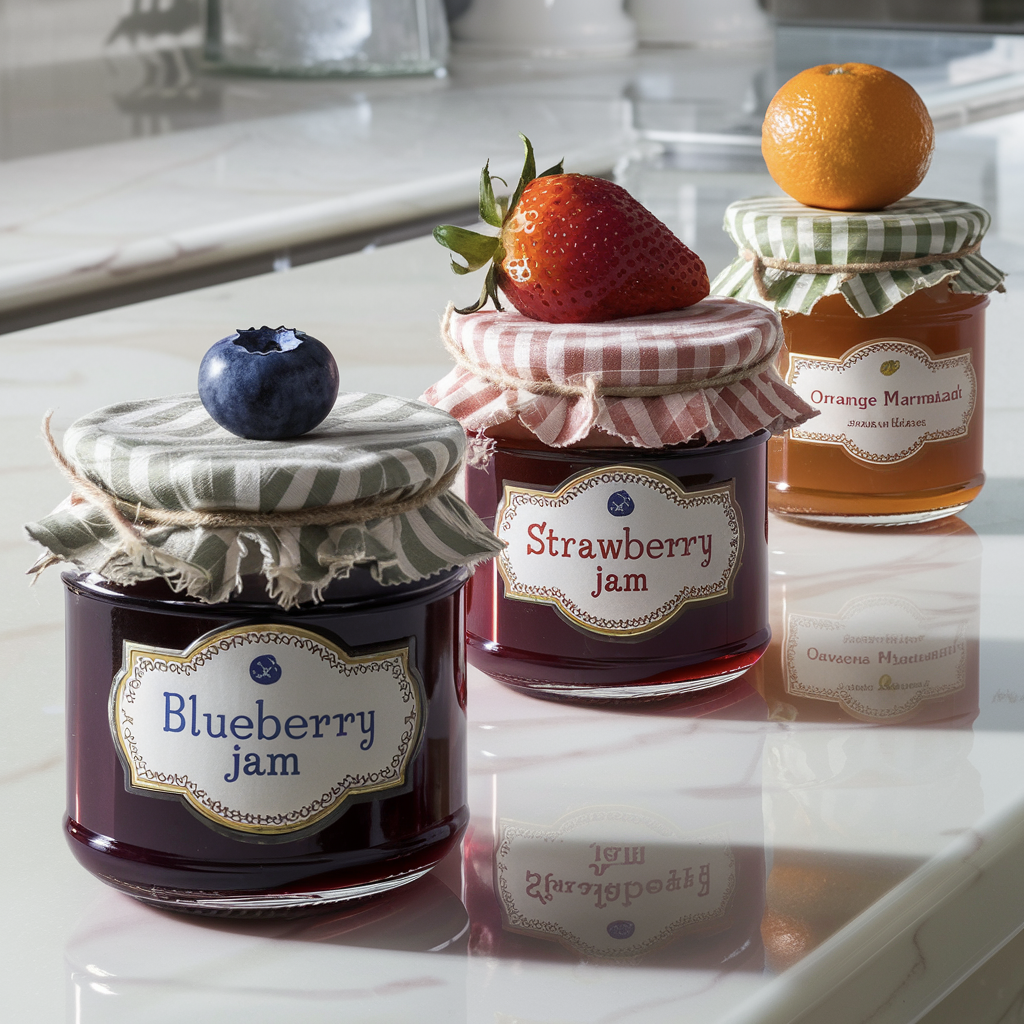
Precision covers position too. Say where each thing sits and in what order, and Ideogram tends to follow:

<figure><img src="https://1799634369-files.gitbook.io/~/files/v0/b/gitbook-x-prod.appspot.com/o/spaces%2FzjhNby3LLsIikYuvxAJP%2Fuploads%2Fm4WwDuohJOhW6EK0V1u5%2Fimage.png?alt=media&amp;token=52b93242-0d72-4709-9315-35dedc463f7e" alt="Three jars on a kitchen counter labelled Blueberry Jam, Strawberry Jam and Orange Marmalade, each topped with its fruit" width="375"><figcaption><p>"...The first jar on the left, in the foreground, is a blueberry jam jar, with a blueberry adorning its lid. The second jar, in the middle and slightly recessed, is a jar of strawberry jam... The third jar, on the right and farthest back, is a jar of orange marmalade..."</p></figcaption></figure>

## Describe only what should show

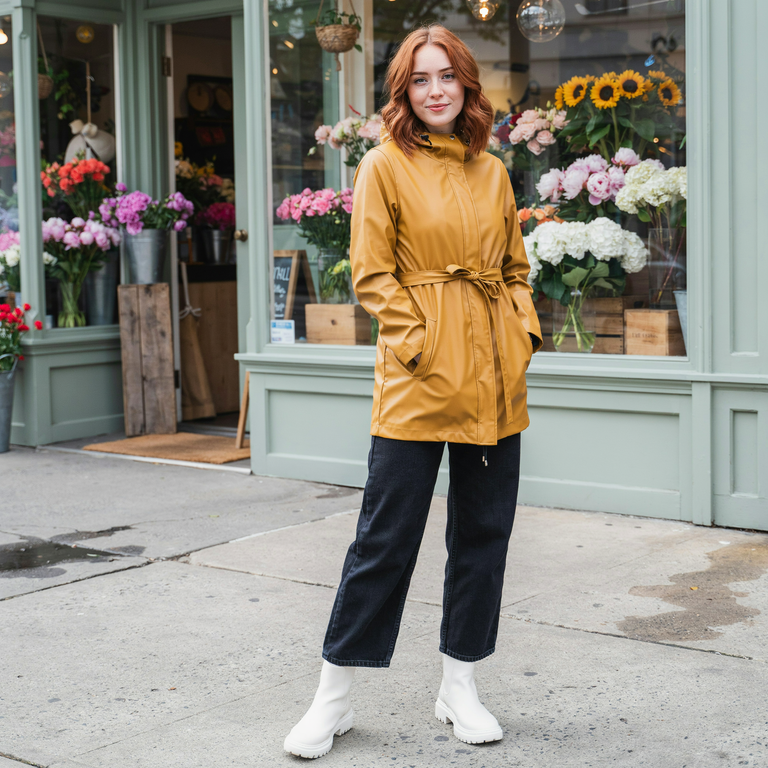
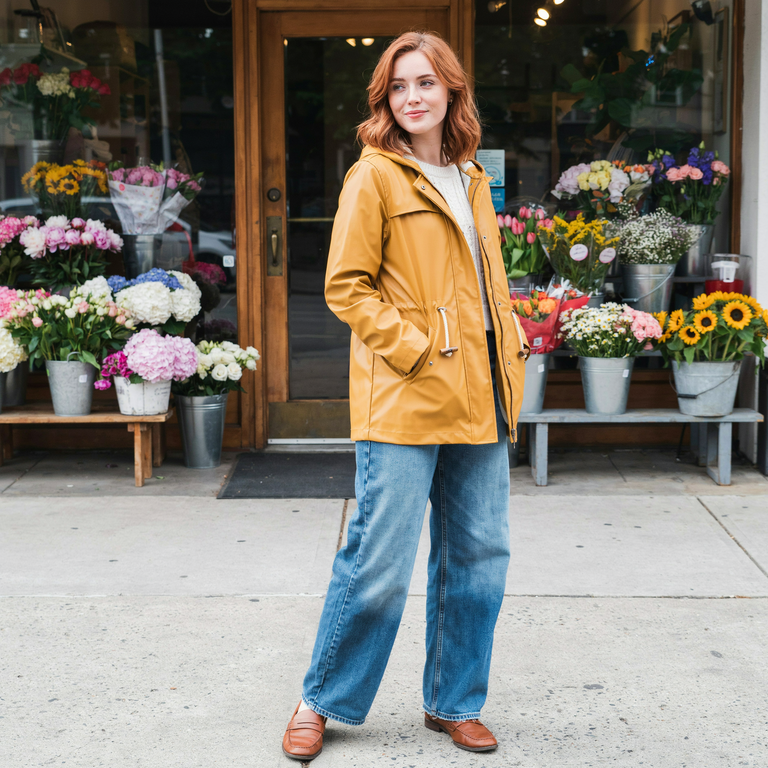
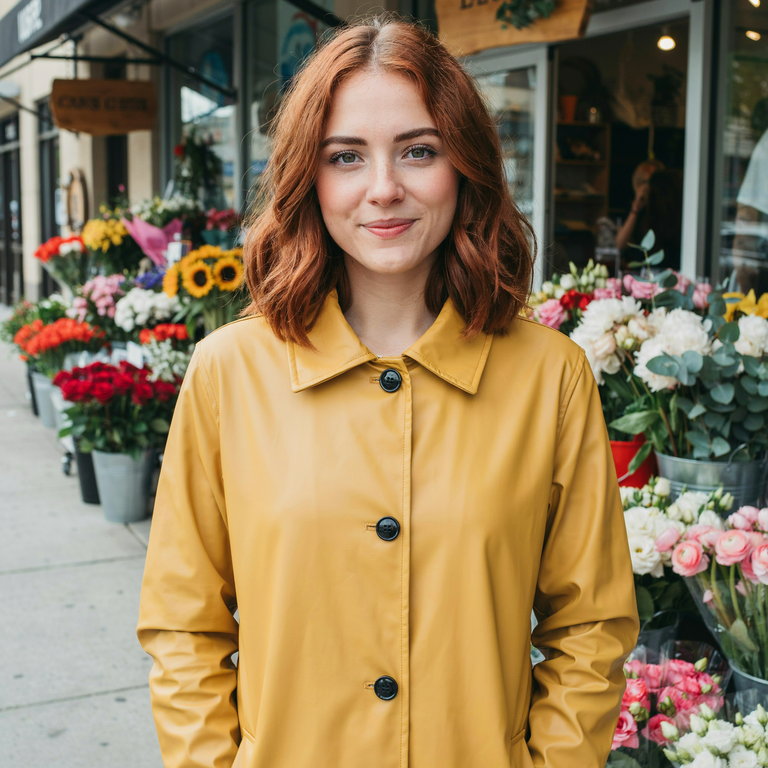
If you describe something, Ideogram tries to show it, even when that breaks the framing you asked for. Below, the goal was a portrait. Mentioning boots, or even just jeans, forced a full-length shot; cutting everything below the waist brought the camera in close.

<table data-view="cards"><thead><tr><th></th><th></th><th></th></tr></thead><tbody><tr><td><img src="https://1799634369-files.gitbook.io/~/files/v0/b/gitbook-x-prod.appspot.com/o/spaces%2FzjhNby3LLsIikYuvxAJP%2Fuploads%2Fgit-blob-d037f97d4b38e7ebeae5f979e12f846b642943e5%2Frefine-portrait-boots.png?alt=media" alt="Full-length photo of a young woman with copper hair in a mustard raincoat, dark jeans and white rain boots outside a flower shop" data-size="original"></td><td><p><strong>Prompt:</strong></p><p><em>Portrait photo of a young woman with copper hair, wearing a mustard raincoat, wide-leg jeans, and white rain boots, in front of a flower shop.</em></p></td><td></td></tr><tr><td><img src="https://1799634369-files.gitbook.io/~/files/v0/b/gitbook-x-prod.appspot.com/o/spaces%2FzjhNby3LLsIikYuvxAJP%2Fuploads%2Fgit-blob-fa5e8c954bc88e5a67e7a779f10b7bcf9a342cb5%2Frefine-portrait-jeans.png?alt=media" alt="Still a full-length photo of the woman in the mustard raincoat and light wide-leg jeans in front of the flower shop" data-size="original"></td><td><p><strong>Prompt:</strong></p><p><em>Portrait photo of a young woman with copper hair, wearing a mustard raincoat, wide-leg jeans, </em><del><em><mark style="color:purple;">and white rain boots</mark></em></del><em>, in front of a flower shop.</em></p></td><td></td></tr><tr><td><img src="https://1799634369-files.gitbook.io/~/files/v0/b/gitbook-x-prod.appspot.com/o/spaces%2FzjhNby3LLsIikYuvxAJP%2Fuploads%2Fgit-blob-9e31db7c1e5f4034f9a58103297da189874b12dd%2Frefine-portrait-coat.png?alt=media" alt="Close head-and-shoulders portrait of the woman with copper hair in the mustard raincoat, flower buckets behind her" data-size="original"></td><td><p><strong>Prompt:</strong></p><p><em>Portrait photo of a young woman with copper hair, wearing a mustard raincoat, </em><del><em><mark style="color:purple;">wide-leg jeans, and white rain boots</mark></em></del><em>, in front of a flower shop.</em></p></td><td></td></tr></tbody></table>

## Try other words

Some words just don't produce the look you want. Swap in a synonym or describe the idea in plain visual terms:

> **Instead of** "lush jungle", **try** "dense rainforest"
>
> **Instead of** "sad expression", **try** "a face with downturned eyes and a slight frown"

If one swap doesn't help, change the related words around it too; a neighbor may be pulling the other way. A thesaurus or a chat assistant can suggest options.

## Emphasize what matters

When the image is right overall but a key detail comes out small or goes missing, give it more weight.

**Mention it more than once.** Refer to the same subject in the summary, the details and the framing:

> "A product photo of a men's perfume bottle named "Nightlife for men" in a sleek studio setup. The bottle is tall and rectangular with dark glass... The bottle stands upright... The bottle is centered in the frame..."

**Describe it more fully.** Add size, color, texture or placement, and tie it to the rest of the scene. If a person's shoes come out missing or odd, "wearing black leather boots that cast a shadow on the sidewalk" gives Ideogram both the object and where it sits.

## Pick the right tool

Rewording isn't always the fastest fix. Once you have an image you mostly like, edit it instead of rolling the dice again.

| Goal                                              | What to do                                                                                   |
| ------------------------------------------------- | -------------------------------------------------------------------------------------------- |
| See what one word changes                         | Fix the [seed](/create/image-settings.md#seed), change one word, generate again              |
| Get more options from a prompt that works         | Generate again, or select **Recreate** on a result to restore its settings                   |
| Keep the look, try a variation                    | **Remix** it in the [Remix app](/edit/remix.md) with a tweaked prompt                        |
| Change one thing in a finished image              | **AI edit** in [Studio](/edit/studio.md), describing the change in words                     |
| Fix a small area (a hand, a face, a word of text) | **Select area** in Studio (paid plans), then describe what should be there                   |
| Show more of the scene or change the shape        | **Reframe** in Studio, or **Extend** (paid plans)                                            |
| Turn a short idea into a full prompt              | Write a few words and let [Magic Prompt](/create/image-settings.md#magic-prompt) expand them |
| Avoid Magic Prompt expansion                      | Turn Magic Prompt off                                                                        |
| Describe separate layout regions                  | Write a [JSON prompt](/prompting/json-prompting.md), then inspect the result                 |

## Compare two generations without losing your starting point

1. Open a result you want to work from and choose **Recreate**, where supported. Review the restored prompt, model and settings before submitting.
2. Change one instruction, such as the light or headline, while leaving the other controls fixed.
3. Generate and compare the new result with the original in **Library** → **Generations**.
4. If the image is already close, choose an edit that matches the remaining issue instead of changing the whole prompt again.

In the List feed, **Reuse prompt** brings back the text and available source references; it doesn't restore the complete run configuration. For the differences between copying, reusing and recreating, see [Create Images](/create/create.md#copy-prompt-reuse-prompt-or-recreate). Switch from Auto to a named model when you need to choose the model explicitly for your comparison.

If something keeps going wrong, check [Fix Common Problems](/prompting/fix-common-problems.md).