> For the complete documentation index, see [llms.txt](https://docs.ideogram.ai/llms.txt). Markdown versions of documentation pages are available by appending `.md` to page URLs; this page is available as [Markdown](https://docs.ideogram.ai/plans-and-billing/available-plans.md).
# Plans and Credits
What each plan includes and how credits work
Last verified: October 1, 2026.
## Plans
| Plan | Monthly billing | Yearly billing | Credits each month |
| ---------- | ------------------ | ----------------------------------------- | --------------------------------------- |
| Free | $0 | $0 | 30 a week (see [Free plan](#free-plan)) |
| Plus | $20/month | $15/month ($180 a year) | 2,400 |
| Pro | $60/month | $42/month ($504 a year) | 7,500 |
| Team | $30 per user/month | $20 per user/month ($240 per user a year) | 3,600 per user |
| Enterprise | Custom | Custom | Custom |
Prices are in US dollars, before tax. Yearly plans still get their credits each month, not all at once. Team plans need at least 2 users. See [Team Plan](/plans-and-billing/team-plan.md).
To compare plan features, or to subscribe, go to **Settings** → **Plans**, or to [ideogram.ai/pricing](https://ideogram.ai/pricing).
{% hint style="info" %}
**Basic plan:** Ideogram no longer sells the Basic plan ($8/month or $7/month billed yearly). If you already have it, you keep it and get 960 credits each month.
{% endhint %}
## How credits work
Images, videos, edits, upscales and app runs all cost credits. The cost depends on the model, quality, size and number of outputs. In most image apps, the run button shows the cost before you start. The Video app doesn't show a cost on its button.
To see what everything costs, including video, go to **Settings** → **Usage costs**.
You spend credits in this order:
1. **Monthly credits** from your plan. They reset on each renewal date, and **unused monthly credits do not roll over**.
2. **Purchased credits** that you bought on top of your plan. See [Buying Extra Credits](/plans-and-billing/buying-extra-credits.md).
### Check your balance
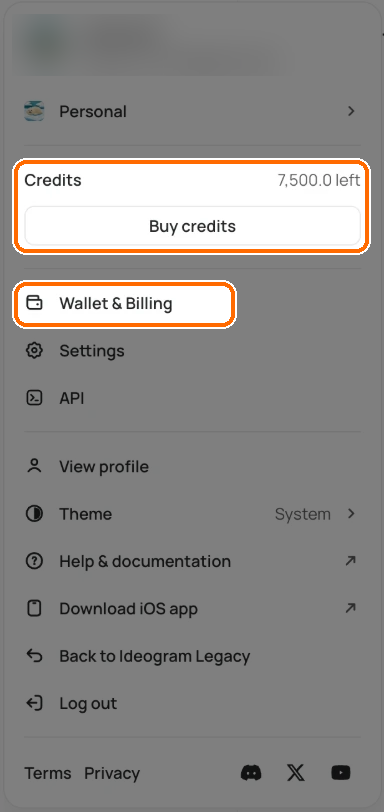
Click your avatar at the bottom of the sidebar. The user menu shows **Credits** and how many you have left. If you have a plan, **Buy credits** sits right below; without one, you'll see **Upgrade**.
Your balance is in the user menu. Wallet & Billing has the details.
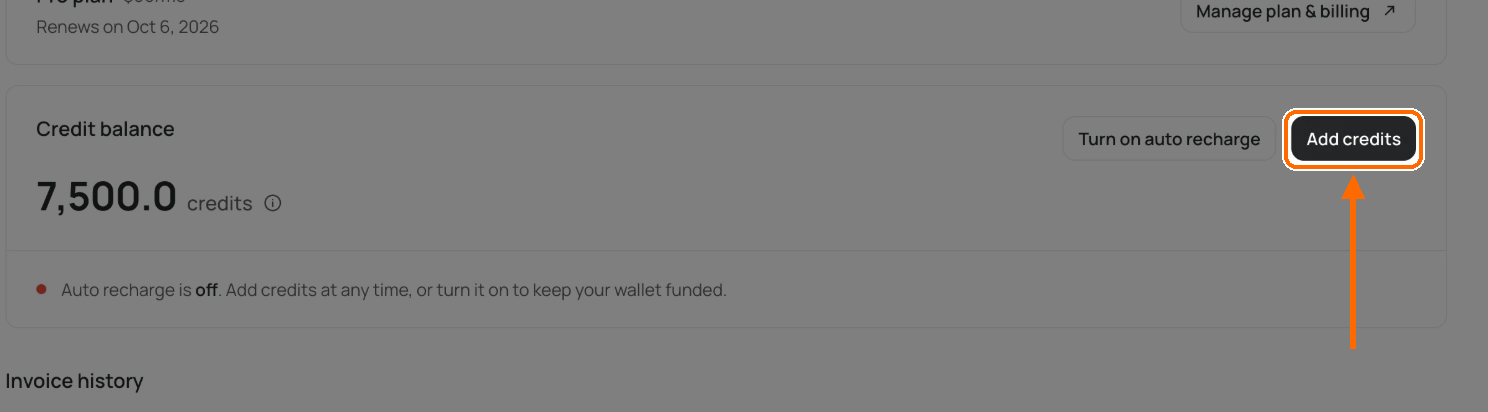
For more detail, click **Wallet & Billing** in the same menu (or go to **Settings** → **Wallet & Billing**). The **Credit balance** card shows your total, with **Add credits** and **Turn on auto recharge**. Hover over the ⓘ next to the total to see monthly and top-up credits.
The Credit balance card on Wallet & Billing.
In a team workspace, members see only their credits in that team. Team owners also see **Wallet & Billing** (the team's billing) and **Buy credits**, which opens the member list so they can top up members' credits. See [Team Plan](/plans-and-billing/team-plan.md).
### After your credits run out
What happens depends on your plan:
| Plan | When your credits run out |
| --------------- | ------------------------------------------------------------------------------------------------------------------------ |
| Free | Wait for next week's 30 credits, or [buy credits](/plans-and-billing/buying-extra-credits.md). |
| Pay as you go | [Buy more credits](/plans-and-billing/buying-extra-credits.md), or turn on auto recharge so your balance refills itself. |
| Basic | Keep using Ideogram models in a slower queue, up to a daily limit. |
| Plus, Pro, Team | Keep using Ideogram models in a slower queue, with no limit. |
On Plus, Pro and Team you can keep generating with Ideogram models after your credits run out. These generations wait in a slower queue. These still need credits:
* custom models;
* partner models;
* generations that use a reference image;
* image edits.
On Basic, Plus, Pro and Team, buy extra credits or wait for your next renewal to keep using them.
## Free plan
Free accounts get 30 credits each week if they sign in with Google, Apple or Microsoft. Accounts created with an email and password don't get free credits; they can [buy credits](/plans-and-billing/buying-extra-credits.md) or subscribe.
On the free plan, everything you generate is public. Plus, Pro, Team and Enterprise keep new images private until you publish them; legacy Basic doesn't.
## Related
* [Billing & Subscriptions](/plans-and-billing/billing-and-subscriptions.md)
* [Buying Extra Credits](/plans-and-billing/buying-extra-credits.md)
* [Team Plan](/plans-and-billing/team-plan.md)
* [Terms of Service](https://ideogram.ai/legal/tos)