> For the complete documentation index, see [llms.txt](https://docs.ideogram.ai/llms.txt). Markdown versions of documentation pages are available by appending `.md` to page URLs; this page is available as [Markdown](https://docs.ideogram.ai/prompting/text-in-images.md).

# Text in Images

How to get clean, correctly spelled text in your images with Ideogram 4.5 and 4.0.

Ideogram can put text almost anywhere in an image: a caption over a photo, a headline on a poster, a brand name on a bottle. Put the exact words in quotation marks and describe where they sit.

**Prompt:**

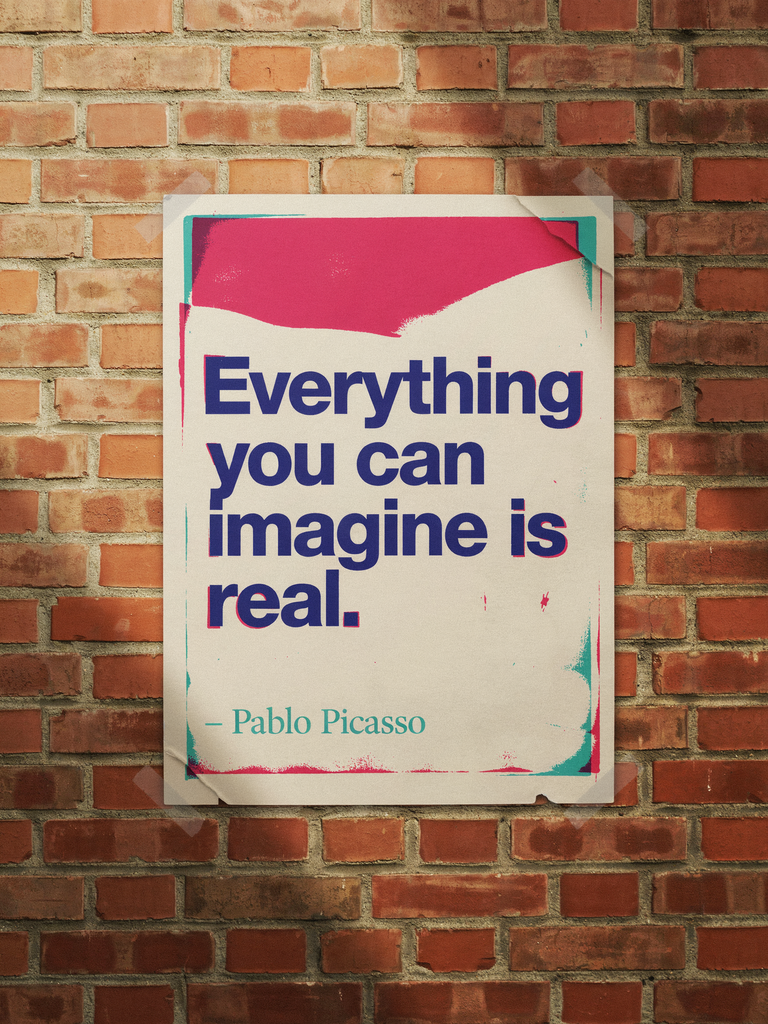
> A risograph poster pasted on a sunlit brick wall with text that reads: "Everything you can imagine is real. – Pablo Picasso"

<figure><img src="https://1799634369-files.gitbook.io/~/files/v0/b/gitbook-x-prod.appspot.com/o/spaces%2FzjhNby3LLsIikYuvxAJP%2Fuploads%2Fgit-blob-0321bdfa2251c5b49636b54e6674af626a76402f%2Ftext-picasso-poster.png?alt=media" alt="Cream risograph poster with a pink ink band pasted on a sunlit brick wall, reading Everything you can imagine is real – Pablo Picasso in bold navy letters" width="375"><figcaption><p>The prompt named the text and where it goes. The model chose the layout and lettering.</p></figcaption></figure>

## Write the text into the prompt

* **Quote the exact words.** Anything inside quotation marks is text to render. Keep spelling and capitals as you want them to appear.
* **Mention the text early.** Text named near the start of the prompt comes out more reliably than text added at the end.
* **Say where it appears.** "Painted across the mural behind the artist" or "curving along the bottom" gives the model a place to put the words.
* **Keep it short.** Each extra word raises the odds of a typo or a dropped letter. Short phrases work best.
* **Keep the scene simple.** A busy scene leaves less room for clean lettering.

> On the wall behind the artist, the phrase "Inspire Daily" is painted in large brush strokes across a mural, at the back of a vibrant and creative studio.

> A vintage poster design with the words "Ride Free" curving along the bottom in retro lettering, featuring a smiling woman on a bicycle on a countryside road.

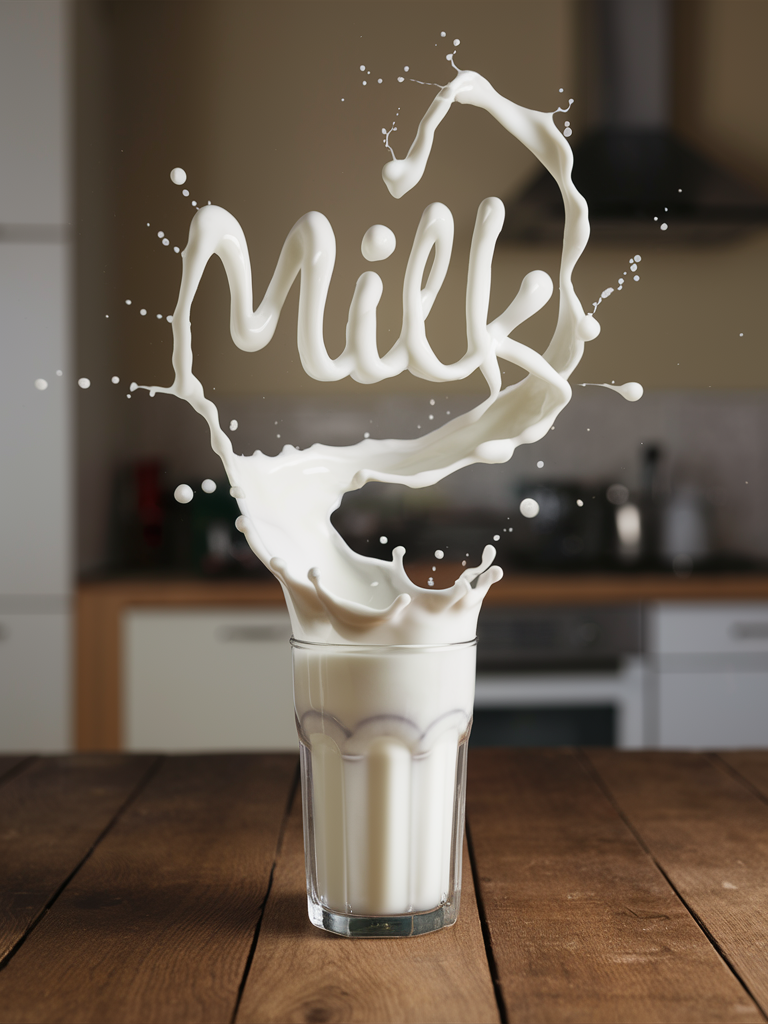
Text can be part of an object, or the object can form the text:

<table data-card-size="large" data-view="cards"><thead><tr><th></th><th></th><th></th></tr></thead><tbody><tr><td><strong>Text on an object</strong></td><td><img src="https://1799634369-files.gitbook.io/~/files/v0/b/gitbook-x-prod.appspot.com/o/spaces%2FzjhNby3LLsIikYuvxAJP%2Fuploads%2F6p6jS2kTbBoz7pAY9mXx%2Fimage.png?alt=media&amp;token=a10ce708-ea64-415b-85ee-bc375840c849" alt="Close-up of a red baseball cap with an embroidered snarling red panda emblem above the team name Red Panda in white script" data-size="original"></td><td><em>A close-up detailed product photo of a vibrant and energetic baseball cap, featuring a stylish red panda embroidered emblem that exudes vitality. The cap is embroidered with the team's name, "Red Panda," displayed boldly in white bold script font below the sleek red panda design.</em></td></tr><tr><td><strong>Text formed by objects</strong></td><td><img src="https://1799634369-files.gitbook.io/~/files/v0/b/gitbook-x-prod.appspot.com/o/spaces%2FzjhNby3LLsIikYuvxAJP%2Fuploads%2FGhPsG86LABMnmApvuUVp%2Fimage.png?alt=media&amp;token=7ae55472-2dd4-49ff-ab55-40dfddf455d0" alt="Milk splashing out of a glass and forming the word Milk in swirly liquid lettering above a wooden kitchen table" data-size="original"></td><td><em>A striking photograph in which a glass of milk is placed on a wooden table. A splash of milk comes out of the glass, forming the word "Milk" in a swirly manner just above the glass. The background is blurred but looks like a homely kitchen.</em></td></tr></tbody></table>

## Describe the lettering

You can't pick a font by name. Ideogram doesn't load real fonts; it learned what text styles look like from images. Describe the weight, shape and mood of the letters instead.

<table data-card-size="large" data-view="cards"><thead><tr><th></th><th></th><th></th></tr></thead><tbody><tr><td><img src="https://1799634369-files.gitbook.io/~/files/v0/b/gitbook-x-prod.appspot.com/o/spaces%2FzjhNby3LLsIikYuvxAJP%2Fuploads%2Fgit-blob-b8bc5c04b873f180e065faeb23152bef0849d20c%2Ftext-type-bold.png?alt=media" alt="The word Welcome in a heavy bold sans-serif typeface, forest green on cream" data-size="original"></td><td><em>The word "Welcome" written in <mark style="color:green;">bold sans-serif</mark> typeface, in deep forest green on a warm cream background.</em></td><td></td></tr><tr><td><img src="https://1799634369-files.gitbook.io/~/files/v0/b/gitbook-x-prod.appspot.com/o/spaces%2FzjhNby3LLsIikYuvxAJP%2Fuploads%2Fgit-blob-f85dbe002cac0729ffb626bbc15a204d005850d3%2Ftext-type-thin.png?alt=media" alt="The word Welcome in an ultra thin sans-serif typeface, forest green on cream" data-size="original"></td><td><em>The word "Welcome" written in <mark style="color:green;">ultra thin sans-serif</mark> typeface, in deep forest green on a warm cream background.</em></td><td></td></tr><tr><td><img src="https://1799634369-files.gitbook.io/~/files/v0/b/gitbook-x-prod.appspot.com/o/spaces%2FzjhNby3LLsIikYuvxAJP%2Fuploads%2Fgit-blob-505688e5d7933716464244976bbd9e6e93b64293%2Ftext-type-serif.png?alt=media" alt="The word Welcome in a classic serif typeface, forest green on cream" data-size="original"></td><td><em>The word "Welcome" written in <mark style="color:green;">serif</mark> typeface, in deep forest green on a warm cream background.</em></td><td></td></tr><tr><td><img src="https://1799634369-files.gitbook.io/~/files/v0/b/gitbook-x-prod.appspot.com/o/spaces%2FzjhNby3LLsIikYuvxAJP%2Fuploads%2Fgit-blob-78e88c535134bd515a3bebe0a1ece3aa821f6c47%2Ftext-type-bauhaus.png?alt=media" alt="The word Welcome in thin rounded Bauhaus-style letters, forest green on cream" data-size="original"></td><td><em>The word "Welcome" written in <mark style="color:green;">thin rounded bauhaus style</mark> typeface, in deep forest green on a warm cream background.</em></td><td></td></tr><tr><td><img src="https://1799634369-files.gitbook.io/~/files/v0/b/gitbook-x-prod.appspot.com/o/spaces%2FzjhNby3LLsIikYuvxAJP%2Fuploads%2Fgit-blob-29a25677f724f9e3c8d6d0808902735e9333a267%2Ftext-type-script.png?alt=media" alt="The word Welcome in a thin formal script with flourishes, forest green on cream" data-size="original"></td><td><em>The word "Welcome" written in <mark style="color:green;">thin and refined formal script</mark> typeface <mark style="color:green;">with flourishes</mark>, in deep forest green on a warm cream background.</em></td><td></td></tr><tr><td><img src="https://1799634369-files.gitbook.io/~/files/v0/b/gitbook-x-prod.appspot.com/o/spaces%2FzjhNby3LLsIikYuvxAJP%2Fuploads%2Fgit-blob-8607fd58e54cc3e3b94b1058ef3984c2c99234d1%2Ftext-type-hippie.png?alt=media" alt="The word Welcome in a bulbous 1960s hippie-style typeface, forest green on cream" data-size="original"></td><td><em>The word "Welcome" written in <mark style="color:green;">an elongated and artistic 1960's hippie-style</mark> typeface, in deep forest green on a warm cream background.</em></td><td></td></tr></tbody></table>

If you leave the style out, the model picks one that suits the scene. [Magic Prompt](/create/image-settings.md#magic-prompt) will also add a fitting style when it expands your prompt.

## More than one block of text

Give each block its own words, style and place. Describe them in reading order, from the top of the image down:

> A vintage jazz poster. At the top, the headline "BLUE NOTE SESSIONS" in large gold serif capitals. Below the trumpeter, "Live jazz every Saturday night" in off-white italic serif. At the bottom, "THE VELVET ROOM" in small gold sans-serif capitals.

Plain text gets you close, but the layout can shift from one run to the next. When each line must land in an exact spot, use a JSON prompt. On Ideogram 4.5 and 4.0, each text element gets its own `text`, `desc` (how it looks), `color_palette` and `bbox`. See [JSON Prompting](/prompting/json-prompting.md) for the format and a full poster example.

## Limits

* **Long passages.** Ideogram handles titles and short blocks well. Add body copy or full documents later in a design tool.
* **Languages.** Text comes out most accurately in English. Non-Latin scripts and accented letters can come out wrong or not at all.

## Fix misspelled text

An image can still come back with a doubled letter or a missing word. Try these in order:

1. Generate again. Each run gives the text another chance.
2. Swap long or unusual words for shorter ones.
3. Fix just the text in [Studio](/edit/studio.md), so the rest of the image stays the same. Download the image, upload it in Studio, then use **AI edit** ("change the sign to read Open Daily") or **Select area**: paint over the wrong word and say what it should read. Select area needs a paid plan.

It's often easier to keep an image whose text is right and fix the scene around it than the other way round. For more on editing a result, see [Refine and Iterate](/prompting/refine-and-iterate.md).

Once you have an image you like, **Layerize text** in Studio turns its text into editable layers you can retype, move or restyle. See [Text and Layers](/edit/text-and-layers.md#layerize-text).